Bill of Materials - List
The Bill of Materials lists every material that goes into the item you currently have open — one row per position. Each row is one material, with the quantity needed, its unit of measure and the operation it is consumed at. The list always belongs to a single item: you reach it by opening that item first, from Bill of Materials in the header of the item detail page.
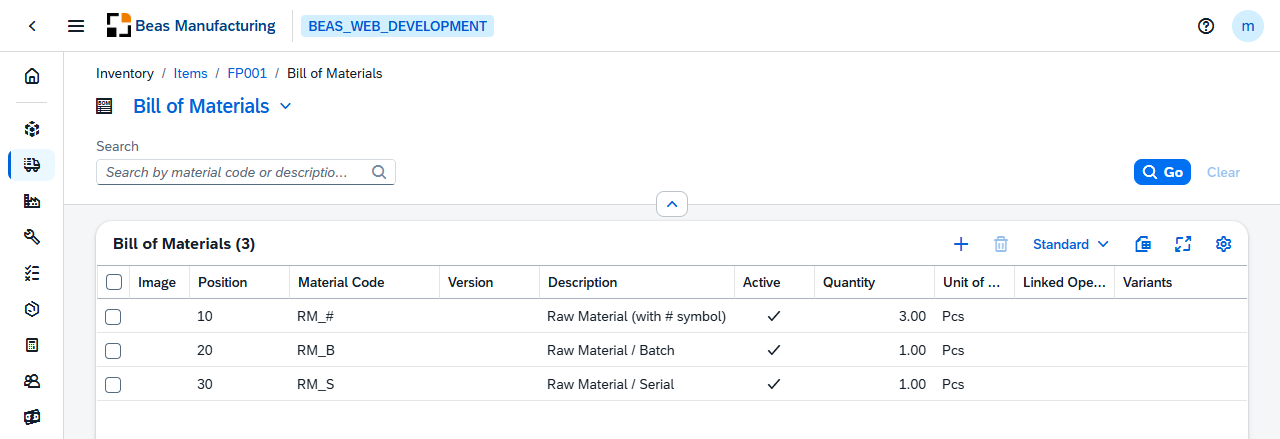
The title carries a version selector. An item under version control has one bill of materials per version, and the selector decides which one you are looking at.
Actions
One action is specific to this list; the rest of the tool bar is the standard one.
| Action | Icon | Description |
|---|---|---|
| Renumber | Renumbers the whole bill of materials in the order the list is in, closing the gaps left by deleted or inserted lines. Asks to confirm first. |
Default Columns
| Column | Description |
|---|---|
| Image | The icon or picture set for the position, when one is defined. |
| Position | The position number inside the Bill of materials. Positions are numbered in steps — 10, 20, 30 — so a new material can be slotted between two existing ones. |
| Material Code | The item consumed at this position. |
| Version | The version of the material, when the material is itself under version control. |
| Description | The material's description. |
| Active | Check mark when the position is used. An inactive position stays on the list but is not planned or issued. |
| Quantity | How much of the material one production of the parent item needs. |
| Unit of Measure | The unit the quantity is expressed in. |
| Linked Operation | The routing operation the material is consumed at. Left empty, the material is consumed at the first operation. |
| Variants | The variants this position belongs to, for a configurable item. Empty means the position is used in every variant. |
Additional Columns
Hidden columns are available in the tool bar settings ().
| Column | Description |
|---|---|
| Position ID | The internal key of the position. |
| Color | The colour set for the position. |
| Alternative Material | Marked when the position has alternative materials defined. |
| Use Own Description | Check mark when the description is typed here instead of taken from the item master. |
| Drawing Number | The material's technical drawing reference. |
| Input Factor | The conversion factor between the entered unit and the stock unit. |
| Quantity Per | The number of parent items the quantity refers to. |
| Stock Quantity | The quantity converted into the material's stock unit. |
| Consumption Qty | The quantity that will actually be consumed, scrap included. |
| Scrap Fixed Quantity | A fixed quantity added on top of the calculated need. |
| Scrap Percentage | A percentage added on top of the calculated need. |
| Rounding Type | How the calculated quantity is rounded: No Rounding, Rounding at .5, Rounding Up, Rounding Down or Multiple of. |
| Rounding Decimals | The decimal places the rounding applies to. |
| Warehouse Code | The warehouse the material is issued from. |
| Bin Code | The bin location within that warehouse. |
| Length | The length the quantity is calculated from, for material bought by length. |
| Width / OD | The width, or outer diameter, the quantity is calculated from. |
| Height / ID | The height, or inner diameter, the quantity is calculated from. |
| Date From | The date the position becomes valid. |
| Date To | The date the position stops being valid. |
| I-Version From | The first item version the position applies to. |
| I-Version To | The last item version the position applies to. |
| I-Version Range | Individual item versions the position applies to, when the range is not contiguous. |
| Planning Method | Automatically or No — whether the material is planned. |
| DIH Synchronization | Full Sync, Update Only or No Sync. |
| Breakdown | Always or Only on shortage — when a component is broken down further. |
| BBD Option | How the Best Before Date is handled for the material. |
| Only Reservation Booking | The position is reserved but never issued automatically. |
| Don't Post Scrap | Scrap on this position is not posted. |
| Breakdown with Variant | The position is broken down together with its variant. |
| Info | The short free-text field of the position. |
| Notes | The long free-text field of the position. |
| Sort | The sort order of the position. |
| UDF1 … UDF15 | The user-defined fields configured for bill-of-materials positions. See UDF Configuration. |
Related functionality
- Routing — the operations the materials are consumed at
- Item Structure — the same bill of materials exploded over all its levels