Bill of Materials - Detail
Open a row in the Bill of Materials list to see one position in full: which material is consumed, how much of it, where it comes from and when the position applies.
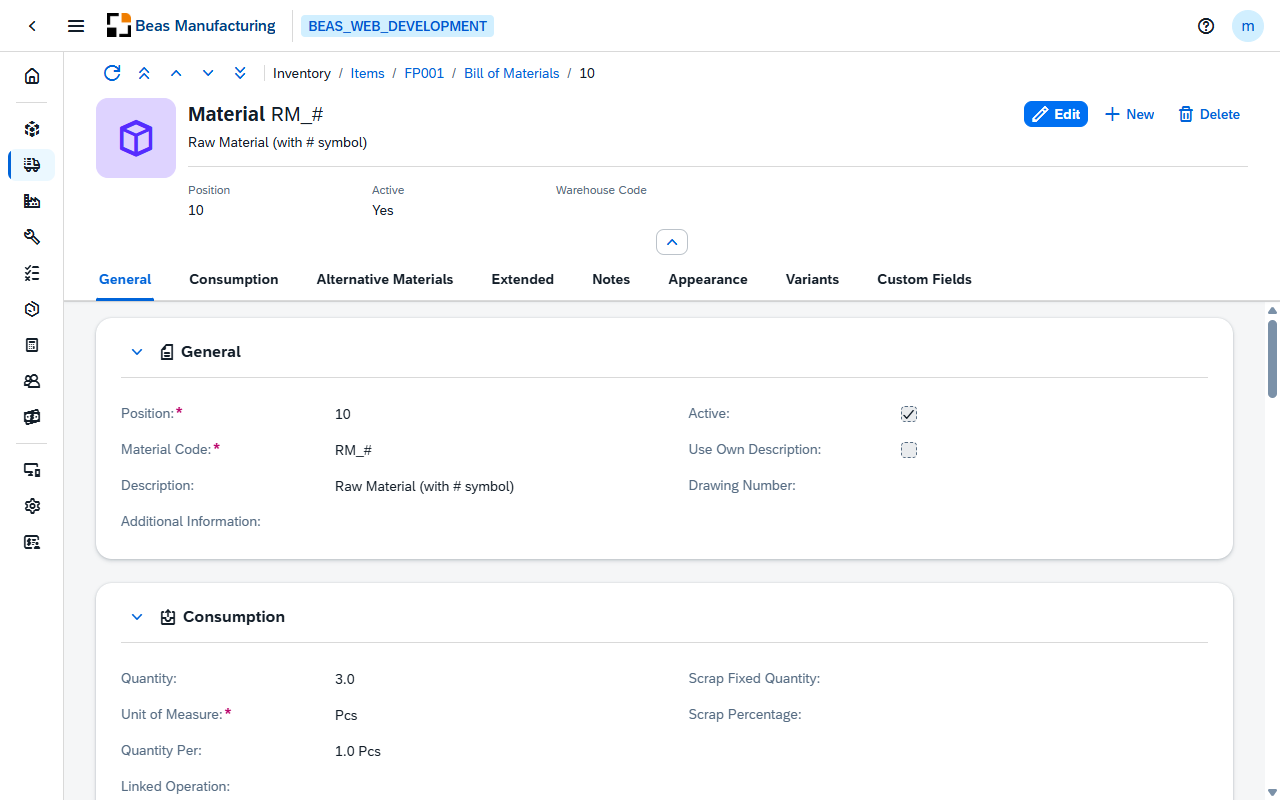
Header
The material's code and description, its icon when one is set, and the four figures that identify the position at a glance:
| Field | Description |
|---|---|
| Position | The position number inside the bill of materials. Required. |
| Active | Check mark (Yes) when the position is used. |
| Warehouse Code | The warehouse the material is issued from, when one is set on the position. |
| Version | The version of the material. Shown when the material is under version control. |
Body
Eight tabs: General, Consumption, Alternative Materials, Extended, Notes, Appearance, Variants and Custom Fields.
General
| Field | Description |
|---|---|
| Position | The position number. Required. New positions are numbered in steps of 10 by default, so a material can later be slotted between two existing ones. |
| Material Code | The item consumed at this position. Required. Choosing it fills in the description, the drawing number and the unit of measure from the item master. |
| Version | The version of the material to consume. Offered when the material is under version control. |
| Use Own Description | When in edit mode, activate check mark to type the description on the position instead of taking it from the item master — for a position that needs wording of its own. |
| Description | The material's description. |
| Drawing Number | The material's technical drawing reference. |
| Additional Information | Free text about the position. |
| Active | Check mark when the position is used. An inactive position stays on the list but is not planned or issued. |
Consumption
How much material one production needs, and where it comes from.
| Field | Description |
|---|---|
| Quantity | The quantity needed. |
| Unit of Measure | The unit the quantity is entered in. |
| Quantity Per | How many parent items that quantity covers — 1 means per piece, 100 means the quantity is for a hundred. |
| Linked Operation | The routing operation the material is consumed at. Left empty, it is consumed at the first operation. |
| Scrap Fixed Quantity | A fixed quantity added on top of the calculated need — a set-up loss that does not grow with the order. |
| Scrap Percentage | A percentage added on top of the calculated need — a loss proportional to the order. |
| Rounding Type | How the calculated quantity is rounded: No Rounding, Rounding at .5, Rounding Up, Rounding Down or Multiple of. |
| Rounding Decimals | The decimal places the rounding applies to. |
| Length | The length the quantity is calculated from, for material bought by length. Carries its own unit. |
| Width / OD | The width, or outer diameter, the quantity is calculated from. Carries its own unit. |
| Height / ID | The height, or inner diameter, the quantity is calculated from. Carries its own unit. |
| Warehouse Code | The warehouse the material is issued from. Leave it empty to follow the item's warehouse rule. |
| Bin Code | The bin location within that warehouse. Offered once the warehouse manages bins. |
Changing the material or the unit of measure recalculates the quantities, because the conversion between the entered unit and the stock unit changes with them. Check the quantity after either change.
Alternative Materials
Materials that may be used in place of the one on the position — the substitutes the shop floor is allowed to reach for when the planned material is short.
| Column | Description |
|---|---|
| Item Code | The alternative item. |
| Description | The item's description, from the item master. |
| Quantity | How much of the alternative replaces the planned quantity. |
| Unit of Measure | The alternative's unit of measure, from the item master. |
| Info | Free text for the row — why or when to use this alternative. |
| Manufacturer | The alternative's manufacturer. |
| Drawing Number | The alternative's drawing reference. |
The list is edited with Create, Edit and Delete above the table, in edit mode. Changes are kept with the position and are written when the position is saved.
Extended
Planning and execution
| Field | Description |
|---|---|
| Breakdown | Always or Only on shortage — when this component is broken down into its own components instead of being taken from stock. |
| Breakdown with Variant | The position is broken down together with its variant. |
| Issue batch remains | Issue what is left of an open batch before opening a new one. |
| Only Reservation Booking | When check mark active, the material is reserved for the order but never issued automatically — someone issues it by hand. |
| Don't Post Scrap | When check mark active, scrap calculated on this position is not posted. |
| Planning Method | Automatically or No — whether the material is planned at all. |
| DIH Synchronization | Full Sync, Update Only or No Sync — how the position behaves when the bill of materials is synchronised from an external system. |
Area of Validity
| Field | Description |
|---|---|
| Date From | The date the position becomes valid. |
| Date To | The date the position stops being valid. Past it, the position is not planned. |
| I-Version From | The first item version the position applies to. |
| I-Version To | The last item version the position applies to. |
| I-Version Range | Individual item versions the position applies to, when the range is not contiguous. |
Notes
| Field | Description |
|---|---|
| Notes | Free text about the position, longer than Additional Information — work instructions, a reason for a substitution, anything the shop floor should read. |
Appearance
| Field | Description |
|---|---|
| Color | The color the position is shown in, in the list and in the item structure. |
| Image | The icon or picture shown for the position. |
Variants
For a configurable item, the variants this position belongs to — 26 rows, A to Z.
| Column | Description |
|---|---|
| Code | The variant letter, A to Z. |
| Name | The variant's name, as defined on the parent item. |
| Active | Tick the variants the position is used in. |
A position with no variant ticked is used in every variant. Will appear as shows what the selection produces.
Custom Fields
The user-defined fields configured for Bill of materials positions, when there are any. See UDF Configuration.
Examples
A material whose consumed quantity does not match what was entered. Four fields on the Consumption tab act on the quantity in sequence: Quantity Per divides it over a number of parent items, Scrap Fixed Quantity and Scrap Percentage add to it, and Rounding Type then reshapes the result. A quantity of 3 with Quantity Per 100 is 0.03 per piece, not 3 — the most common surprise on this page.
One position that has to cover two item versions differently. Rather than maintaining two bills of materials, give the position an I-Version From / I-Version To range and add a second position for the other range. Both stay in the list, and each work order picks up the one that matches the version it produces.