Items - List
The Items list is the entry point to the item master data — every material, semi-finished product, finished product and service the company works with. Each row is one item, with its code, description, stock figures and classification. From here you can search and filter the catalog, open any item to see or edit its full master data, create new items, or delete items you no longer need.
An item's Bill of Materials, Routing and Product Cost views are reached from the item detail page, not from this list.
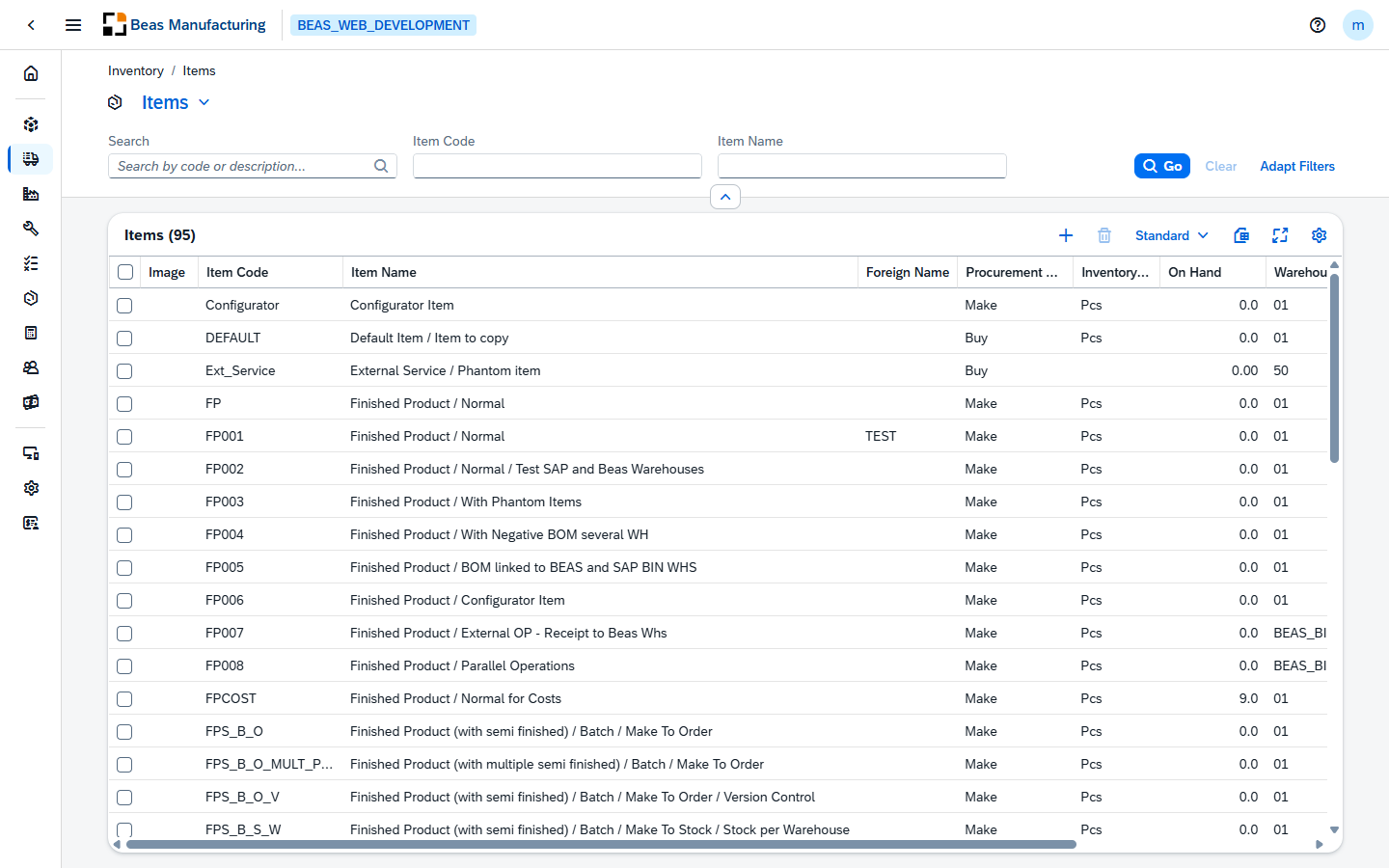
Default Columns
| Column | Description |
|---|---|
| Image | The picture saved for the item, when one is defined. |
| Item Code | The unique item number (the SAP item code). |
| Item Name | The item's description. |
| Foreign Name | The description in the foreign language. |
| Procurement Method | Whether the item is bought or manufactured (Buy, Make). |
| Inventory UoM | The unit of measure the stock figures are expressed in. |
| On Hand | Quantity currently in stock. |
| Warehouse | The item's default warehouse. |
| Material Group | The Beas material group the item belongs to. Click the value to open the group. |
| Valid | Check mark when the item is active. |
Additional Columns
Hidden columns are available in the tool bar settings ().
| Column | Description |
|---|---|
| Tree Type | The SAP bill-of-materials type of the item (Not a Tree, Production, Template, Sales BoM, Assembly). |
| Committed | Quantity committed to open documents. |
| Ordered | Quantity on open purchase or production orders. |
| Raw Material | The Beas raw material assigned to the item. |
| Frozen | Check mark when the item is inactive. |
| Sales Item | The item can be sold. |
| Purchasing Item | The item can be purchased. |
| Inventory Item | The item is stock-managed. |
| Phantom | The item is a phantom assembly. |
| Created | Date the item was created. |
| Modified | Date the item was last changed. |
| Item Type | Items, Labor or Travel. |
| Item Group | The SAP item group. |
| Series | The numbering series the item code came from. |
| Additional Identifier | The item's secondary identifier. |
| Match code | The short code used to find the item quickly. |
| Drawing Number | The technical drawing reference. |
| DIN | The DIN standard the item complies with. |
| Country/Region of Origin | The country the item comes from. |
| Employee | The employee responsible for the item. |
| Manufacturer | The item's manufacturer. |
| Version | The item version. |
| Version Control | How the item's versions are administered. |
| Active From | The date the item becomes active. |
| Active To | The date the item stops being active. |
| Active Remarks | The note explaining the active period. |
| Inactive From | The date the item becomes inactive. |
| Inactive To | The date the item stops being inactive. |
| Inactive Remarks | The note explaining the inactive period. |
| Breakdown | How the item behaves as a component. |
| Manage Batch Numbers | The item is tracked by batch. |
| Manage Serial Numbers | The item is tracked by serial number. |
| Batch Determination | How the batch is determined when the item is consumed. |
| Automatic Serial Number Creation on Receipt | Serial numbers are created when the item is received. |
| Made-To-Order | The item is produced against a specific order. |
| MPS | The item takes part in the master production schedule. |
| Release Production | Production may be released for the item. |
| Priority | The planning priority. |
| BEAS Lead Time | The replenishment time Beas plans with. |
| Lot Size Production | The production lot size. |
| Lot Size Production Unit | The unit the production lot size is expressed in. |
| Lot Size / Calculation | The lot size used for costing. |
| Lot Size Calculation Unit | The unit that lot size is expressed in. |
| Scrap | The scrap expected on the item. |
| Cut-Off | The cutting table applied to the item. |
| Calculation Schema | The schema the item is costed with. |
| Calculation Price | The price the calculation starts from. |
| Item Cost | The item's current cost. |
| Cost Center | The cost center the item books against. |
| Set G/L Accounts By | Whether the G/L accounts come from the warehouse, the item group or the item. |
| Valuation Method | Moving average, standard or FIFO. |
| Advanced Rule Type | The advanced G/L rule the item follows. |
| Management Method | How the item is managed on documents. |
| Issue Primarily By | Backflush or manual issue. |
| Bin Location Rule | The rule that picks the bin the item is stored in. |
| Shipping Type | The shipping method used for the item. |
| Shelf Life in Days | How long the item stays usable. |
| Accumulation | How quantities are accumulated for the item. |
| UoM Group | The unit-of-measure group the item belongs to. |
| UoM Code | The item's inventory unit. |
| Default Purchasing UoM | The unit purchases are entered in. |
| Purchase UoM | The name of that purchasing unit. |
| Default Sales UoM | The unit sales are entered in. |
| Sales UoM | The name of that sales unit. |
| Production UoM | The unit consumption is booked in. |
| Default Items per Purchase Unit | How many inventory units one purchase unit holds. |
| Default Items per Sales Unit | How many inventory units one sales unit holds. |
| Pricing Unit | The quantity the price refers to. |
| Specific Weight | The weight per unit of volume. |
| Net Weight | The sales weight. |
| Gross Weight | The gross weight. |
| Inventory Weight 1 | The first stock weight. |
| Inventory Weight 2 | The second stock weight. |
| Inventory Unit of Weight 1 | The unit of the first stock weight. |
| Inventory Unit of Weight 2 | The unit of the second stock weight. |
| Purchase Height | The purchasing height. |
| Purchase Length | The purchasing length. |
| Purchase Width | The purchasing width. |
| Purchase Height UoM | The unit of the purchasing height. |
| Purchase Length UoM | The unit of the purchasing length. |
| Purchase Width UoM | The unit of the purchasing width. |
| Purchasing Height 2 | The second purchasing height. |
| Purchasing Length 2 | The second purchasing length. |
| Purchasing Width 2 | The second purchasing width. |
| Purchasing Unit of Height 2 | The unit of the second purchasing height. |
| Purchasing Unit of Length 2 | The unit of the second purchasing length. |
| Purchasing Unit of Width 2 | The unit of the second purchasing width. |
| Purchasing Volume | The purchasing volume. |
| Purchasing Unit of Volume | The unit of the purchasing volume. |
| Purchasing Weight 1 | The first purchasing weight. |
| Purchasing Weight 2 | The second purchasing weight. |
| Purchasing Unit of Weight 1 | The unit of the first purchasing weight. |
| Purchasing Unit of Weight 2 | The unit of the second purchasing weight. |
| Sales Height 1 | The first sales height. |
| Sales Height 2 | The second sales height. |
| Sales Length 1 | The first sales length. |
| Sales Length 2 | The second sales length. |
| Sales Width 1 | The first sales width. |
| Sales Width 2 | The second sales width. |
| Sales Unit of Height 1 | The unit of the first sales height. |
| Sales Unit of Height 2 | The unit of the second sales height. |
| Sales Unit of Length 1 | The unit of the first sales length. |
| Sales Unit of Length 2 | The unit of the second sales length. |
| Sales Unit of Width 1 | The unit of the first sales width. |
| Sales Unit of Width 2 | The unit of the second sales width. |
| Sales Volume | The sales volume. |
| Sales Unit of Volume | The unit of the sales volume. |
| Sales Weight 2 | The second sales weight. |
| Sales Unit of Weight 1 | The unit of the first sales weight. |
| Sales Unit of Weight 2 | The unit of the second sales weight. |
| Purchasing Packaging UoM | The purchasing package. |
| Purchasing Quantity per Package | How much the purchasing package holds. |
| Sales Packaging UoM | The sales package's unit of measure. |
| Sales Quantity per Package | How much the sales package holds. |
| Do Not Apply Discount Groups | Discount groups are ignored for the item. |
| Tax Code (A/R) | The tax code used on sales documents. |