Open a row in the Items list to see an item's full master data. The
page opens in display mode; press Edit to make changes.
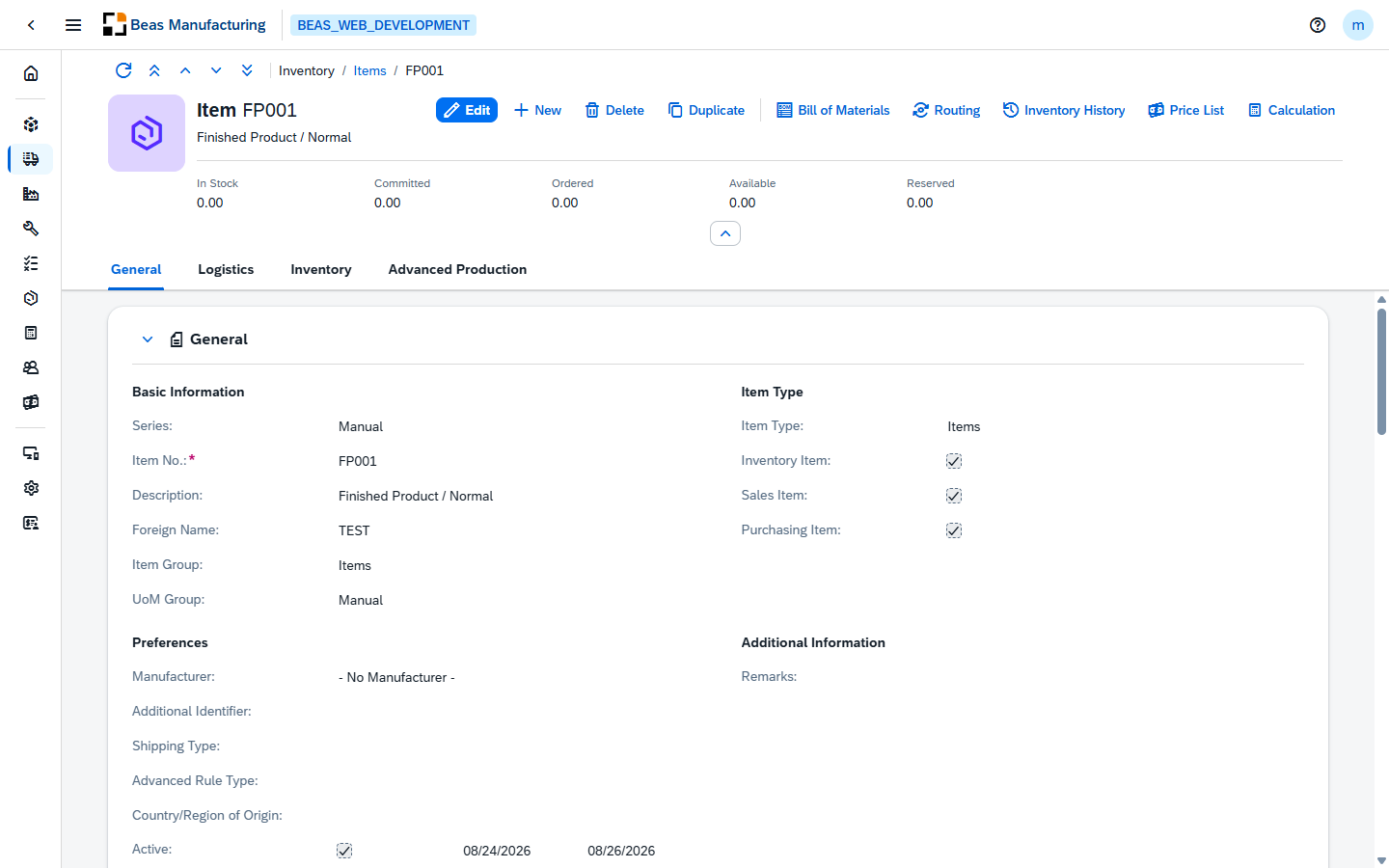
The item's code and name, its picture when one is saved, and its stock figures at a glance:
| Field | Description |
|---|
| In Stock | The quantity physically in stock. |
| Committed | The quantity committed to open documents. |
| Ordered | The quantity on order from suppliers. |
| Available | In stock − committed + ordered. |
| Reserved | The quantity reserved by Beas. |
The action buttons:
| Field | Description |
|---|
| Bill of Materials | Opens this item's Bill of Materials — the materials it is made of. |
| Routing | Opens this item's Routing — its manufacturing operations. |
| Inventory History | Opens Inventory History filtered to this item. |
| Price List | Opens the item's price list entries — see Price List. |
| Calculation | Opens the item's Product Cost view with the calculated production cost. |
Price List
Price List opens a dialog with one row per price list the item appears in:
| Field | Description |
|---|
| Price List | The price list number. |
| Name | The price list name. |
| Price | The item's price in that list. |
| Currency | The price currency. |
| Overwritten | Marked when the list price was overwritten for this item. |
Two item-level prices are appended at the end without a price list number: Last Purchase Price
and Last Valuated Price.
Body
Four tabs: General, Logistics, Inventory and Advanced Production.
General
| Field | Description |
|---|
| Series | The numbering series of the item. |
| Item No. | The unique item code. Required, and set when the item is created. |
| Description | The item name. |
| Foreign Name | The description in the foreign language. |
| Item Group | The SAP item group. |
| UoM Group | The Unit of measure group. |
Item Type
| Field | Description |
|---|
| Item Type | Items, Labor or Travel. |
| Inventory Item | Check mark when item is stock-managed. |
| Sales Item | Check mark, when the item can be sold. |
| Purchasing Item | Check mark, when the item can be purchased. |
Preferences
| Field | Description |
|---|
| Manufacturer | The manufacturer of the item. |
| Additional Identifier | A further identifier for the item. |
| Shipping Type | The default shipping type. |
| Country/Region of Origin | Origin of the item, with a choose-from-list of countries. |
| Active | Check mark plus an optional validity period (from/to dates) and a remarks line, shown while the flag is on. |
| Inactive | Check mark plus an optional inactivity period (from/to dates) and a remarks line, shown while the flag is on. |
| Field | Description |
|---|
| Remarks | Free text about the item. |
Logistics
Serial and Batch Numbers
| Field | Description |
|---|
| Manage Item By | None, Batches or Serial Numbers. This setting drives the Batch / Serial Number group and the Version group on the Advanced Production tab. |
Inventory
| Field | Description |
|---|
| Set G/L Accounts By | Warehouse, Item Group or Item Level. |
| UoM Code | The code of the inventory unit of measure, taken from the UoM group. |
| UoM Name | The name of the unit of measure taken from the UoM group. |
| Weight | The item's inventory weight, with its unit. |
| Inventory Counting UoM Code | The code of the unit used for inventory counting. |
| Inventory Counting UoM Name | The name of the Inventory Counting UoM. |
| Items per Counting Unit | How many items one counting unit holds. |
| Valuation Method | Moving Average, Standard, FIFO or Serial/Batch. |
Inventory Level
| Field | Description |
|---|
| Manage Inventory by Warehouse | When on, the min/max levels apply per warehouse. |
| Required Inventory Level | The desired inventory level. |
| Min. Inventory | The minimum stock level. |
| Max. Inventory | The maximum stock level. |
Warehouses
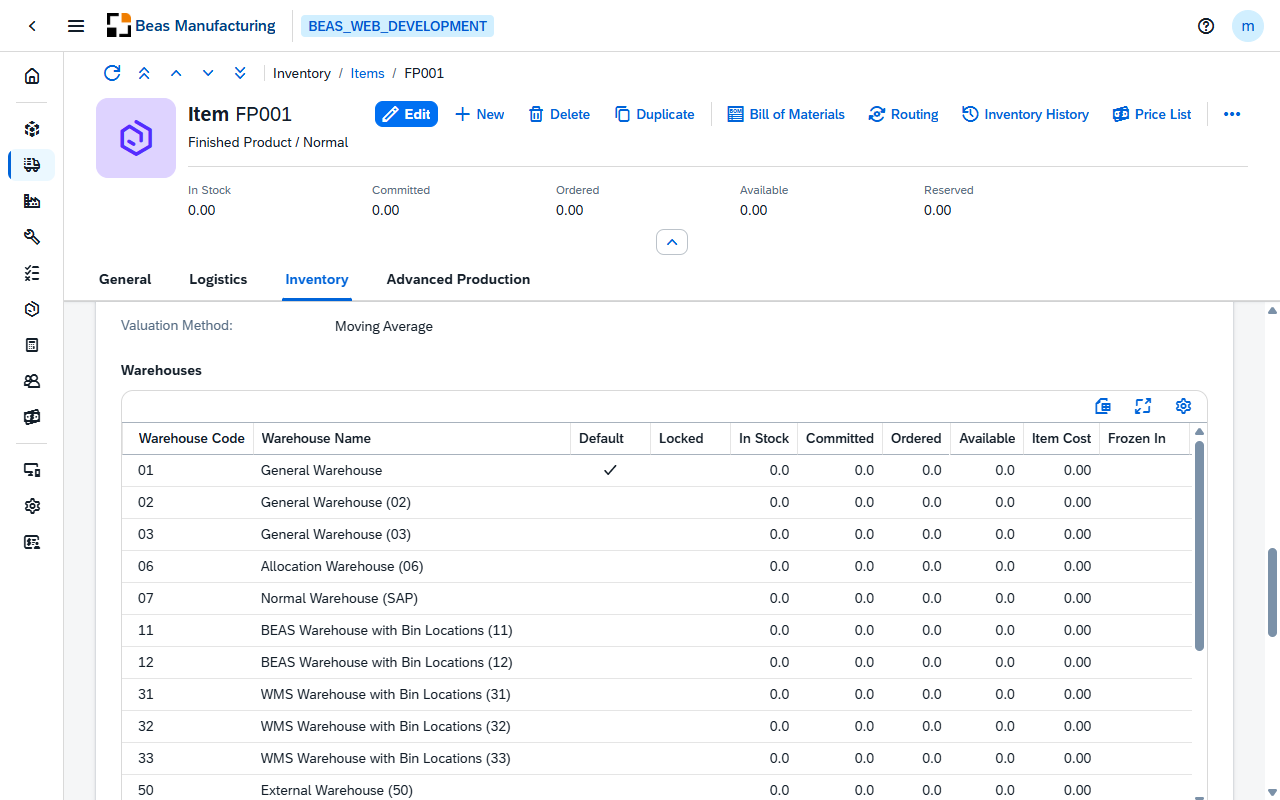
One row per warehouse the item is defined in.
| Column | Description |
|---|
| Warehouse Code | The warehouse. |
| Warehouse Name | The warehouse's description. |
| Default | Check mark on the item's default warehouse. |
| Locked | The item is locked in that warehouse. |
| In Stock | The quantity physically in that warehouse. |
| Committed | The quantity committed to open documents there. |
| Ordered | The quantity on order into that warehouse. |
| Available | In stock − committed + ordered, for that warehouse. |
| Item Cost | The item's cost in that warehouse. |
| Frozen In | The item is frozen in that warehouse. |
| Min. Inventory | The minimum stock level for that warehouse. |
| Max. Inventory | The maximum stock level for that warehouse. |
| Required Inventory Level | The desired stock level for that warehouse. |
Further columns — the counting figures, the bin defaults, the localization fields and the
per-warehouse G/L account determination — are available through the tool bar settings
().
Advanced Production
The Beas production settings of the item.
Production Data
| Field | Description |
|---|
| Procurement Method | Scheduling creates production order recommendations for the item (Make), or purchase order recommendations for the item (Buy). |
| Employee | The responsible employee. |
| Cost Center | The item's cost center. |
| Raw Material | The Beas raw material. |
| Material Group | The Beas material group. |
| DIN | The DIN standard. |
| Match code | A search keyword for the item. |
| Drawing Number | The engineering drawing reference. |
| Issue Method | Backflush or Manual. |
Manufacturing Data
| Field | Description |
|---|
| Breakdown | How the item is broken down in planning. Manufactured items offer No Breakdown, Storage Related, Order Related and Phantom Assembly Group; purchased items offer No Breakdown and Provision Related. |
| Production UoM | The production unit of measure. |
| Lot Size / Production | The production lot size, with a unit selector (inventory or production UoM). Manufactured items only. |
| Release Production | Whether production is released for the item. Manufactured items only. |
| Scrap Table / Cut-Off Table | The scrap table — labeled Cut-Off Table for purchased items. |
| Specific Weight | The specific weight of the item. |
| Scrap / Cut-Off | The scrap percentage — labeled Cut-Off for purchased items. |
Warehouse
| Field | Description |
|---|
| Warehouse Rule | The rule applied when issuing and receiving the item. |
Version
Shown when the item carries a version or is managed by batch / serial number.
| Field | Description |
|---|
| I-Version | The item version the item is currently on, assigned through version administration. Required once the item owns versions. |
| Administration | The version administration mode: Standard, Extended View or Separate Bill of Materials. Shown once a version is selected. |
Scheduling
| Field | Description |
|---|
| Accumulation | How requirements are accumulated when scheduling: Detail, Day, Week, Month or Total. |
| MPS | Check mark when the item takes part in master production scheduling. |
| Priority | The scheduling priority. |
Calculation
Manufactured items only.
| Field | Description |
|---|
| Calculation Schema | The calculation schema used for product costing. |
| Lot Size / Calculation | The lot size used for the cost calculation, with a unit selector (inventory or production UoM). |
| Calculation Price | The calculated price of the item. |
Batch / Serial Number
Shown for batch- or serial-managed items.
| Field | Description |
|---|
| Batch Determination | For batch-managed items: Automatic batch determination, Batch determination by material, or Manual batch entry. |
| Serial Number Determination | For serial-managed items: Automatic serial number determination or Manual serial number entry. |
| Shelf Life in Days | The shelf life of the item. |
Examples
The item has stock, but production says there is nothing to issue. The header separates the four
figures for exactly this case: In Stock is what is physically there, Committed is what other
documents have already claimed, Ordered is what is still coming, and Available is
In Stock − Committed + Ordered. Reserved sits next to them and is Beas's own figure: the
quantity tied to work order reservations. An item with 40 in stock, 40 committed and 40 reserved is
full and untouchable at the same time — the stock is there, but every unit belongs to something.
A manufactured item that never turns up in planning. Work down the Advanced Production tab
in order. Breakdown decides how the item behaves when it is a component: a Phantom Assembly
Group is never planned in its own right. Release Production is what allows it to be produced at
all. Lot Size / Production and the scrap table set the quantities that get planned. Then press
Bill of Materials and Routing in the header — until the item has both, it is manufactured on
paper but never appears in Material Requirements.
Whether the item counts as manufactured or purchased comes from SAP, not from this page, and it
decides what you see here: the Calculation group and several Manufacturing Data fields only
appear on a manufactured item.