Routing - List
The Routing lists all the manufacturing operations that make up the item you currently have open — the ordered work steps needed to produce it, such as cutting, assembly or finishing. Each row is one operation, with the resource that performs it and its times. The list always belongs to a single item: you reach it by opening that item first, from Routing in the header of the item detail page.
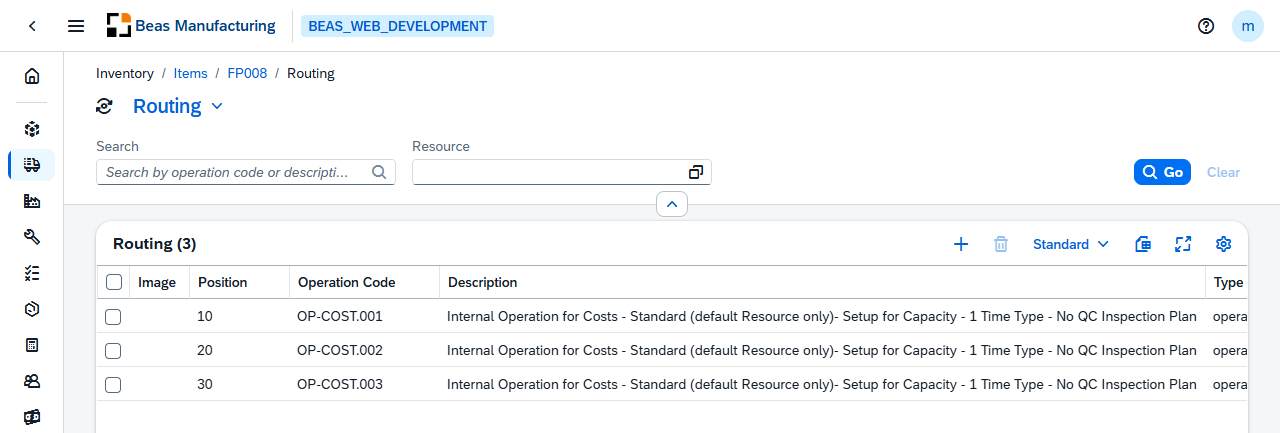
The title carries a version selector. An item under version control has one routing per version, and the selector decides which one you are looking at.
Actions
One action is specific to this list; the rest of the tool bar is the standard one.
| Action | Icon | Description |
|---|---|---|
| Renumber | Renumbers the whole routing in the order the list is in, closing the gaps left by deleted or inserted steps. Asks to confirm first. |
Default Columns
| Column | Description |
|---|---|
| Image | The icon or picture set for the operation, when one is defined. |
| Position | The position number inside the routing. Positions are numbered in steps — 10, 20, 30 — so an operation can be slotted between two existing ones. The order of the positions is the order the work is done in. |
| Operation Code | The operation performed at this position, from the operation catalog. |
| Description | The operation's description. |
| Type | What kind of step the position is: an operation, an external operation, a milestone or a text line. The type decides which of the fields below apply. |
| Resource | The resource that performs the operation — the machine, workstation or employee. |
| Setup time | The time needed to set the resource up before the work starts. |
| Processing time | The time the work itself takes. |
| Variants | The variants this operation belongs to, for a configurable item. Empty means the operation is used in every variant. |
The two time columns are named after the time types configured in your system, so their headers read differently from one installation to the next — Setup time for Precalculation and Processing, for example. What they hold does not change.
Additional Columns
Hidden columns are available in the tool bar settings (). There are many: an operation carries the times, the costing rules, the validity and the subcontracting data all on the same record.
| Column | Description |
|---|---|
| Setup Time Capacity | The setup time charged against the resource's capacity, when it differs from the setup time used for costing. |
| Rework | The time reserved for reworking the output of the operation. |
| Quality Control | The time reserved for inspecting the output. |
| Quantity per Time | How many pieces the operation produces per time unit — the alternative to entering a processing time directly. |
| Time Unit | The unit the quantity per time refers to. |
| Time Type | The time type the operation books against. |
| Idle Time | Waiting time after the operation, before the next one can start. |
| Overlap Limit | How far the next operation may start before this one has finished. |
| Cost Center | The cost center the operation is booked to. |
| Use Factor | The share of the resource the operation occupies. |
| Work Steps | The number of work steps the operation represents. |
| Number of Payslips | The number of payslips the operation produces. |
| Scrap Factor | The scrap expected on the operation, as a percentage. |
| Scrap of material % | The material scrap the operation causes. |
| Invisible in precalculation | The operation is not shown in the precalculation. |
| Value only in precalculation | The operation contributes its value to the precalculation but nothing else. |
| Invisible in post calculation | The operation is not shown in the post calculation. |
| Time Type ID | The cost element the operation's own time books against. |
| Setup Time Type ID | The cost element the setup time books against. |
| Post Process Time Type ID | The cost element the rework time books against. |
| Auxiliary Time Type ID | The cost element the quality-control time books against. |
| Labor Costs on Cost Type | The cost element the labour cost books against. |
| Processing Type ID | The processing type the operation books against. |
| Formula | The formula used to calculate the operation's time. |
| Clock Mandatory | Time must be clocked on this operation before it can be closed. |
| Resource Allocation | How many resources the operation occupies at once. |
| Allocation Quantity | The number of resources allocated. |
| Resource optimization | The operation takes part in resource optimisation. |
| Belongs to Master Operation | The operation is a slave of the operation before it and is scheduled with it. |
| Login Block | Logging on to the operation is blocked. |
| Block closing with less quantity | The operation cannot be closed with less than the planned quantity. |
| Confirm in Units | Confirmations are entered in units rather than in time. |
| Factor per Production UoM | The conversion factor between the confirmation unit and the production unit. |
| Operation Active | Whether the operation is used, and what decides it — always, never, or a quantity threshold. |
| From | The lower quantity threshold of Operation Active, for the conditions that use one. |
| To | The upper quantity threshold of Operation Active, used by the between condition. |
| Threshold From | The quantity the operation starts applying from, when it is threshold-driven. |
| Threshold To | The quantity the operation stops applying at. |
| Time Recording | Whether time is recorded on the operation. |
| Time Recording Date | The date time recording applies from. |
| Processing Type | The processing type of the operation. |
| Wage Group | The wage group the operation is paid at. |
| QC Inspection Plan | The inspection plan applied to the operation's output. |
| Milestone | The operation is a milestone. |
| Valid From | The date the operation becomes valid. |
| Valid To | The date the operation stops being valid. |
| I-Version From | The first item version the operation applies to. |
| I-Version To | The last item version the operation applies to. |
| I-Version Range | Individual item versions the operation applies to, when the range is not contiguous. |
| Beas Version | The routing version the operation belongs to. |
| DIH Synchronization | Full Sync, Update Only or No Sync — how the operation behaves when the routing is synchronised from an external system. |
| Subcontract Flag | Marks the operation as subcontracted. The columns that follow are filled in for an external operation — work sent out to a supplier. |
| Supplier | The supplier that performs the operation. |
| Item | The service item the purchase order is raised for. |
| Price per unit | The agreed price. |
| Price factor | The number of units that price covers. |
| Minimum price | The minimum the supplier charges regardless of quantity. |
| Shipping price | The transport cost. |
| Shipment lot size | How the transport cost is applied. |
| Currency | The currency of the prices. |
| Purchase order on Warehouse | The warehouse the purchase order receives into. |
| Position ID | The internal key of the position. |
| Color | The colour set for the operation. |
| Instructions | The work instructions for the operation. |
| Attachment 1 … Attachment 3 | The files attached to the operation. |
| Unit | The unit the operation's quantities are expressed in. |
| Sort ID | The sort order of the operation. |
| UDF1 … UDF15 | The user-defined fields configured for routing operations. See UDF Configuration. |
Related functionality
- Bill of Materials — the materials consumed at these operations
- Item Structure — the routing and the materials together, exploded over all levels
- Resources — the resources that perform them