Available to Promise
Available to Promise simulates the production of a finished product and returns the date it could be delivered, together with the two things that date depends on: the capacity of the resources its operations need, and the material its components would consume.

The result is a row of five dates, read left to right. A Calculated Start later than Start means something is in the way, and Delivery is the answer — the date you can promise. Above them the simulation repeats what it was asked: the final product, its version, the warehouse and the stock on hand.
Nothing is written — no work order, no reservation, no change to the item — so the simulation can be run as often as needed.
Production timeline
| Step | Description |
|---|---|
| Start | Earliest date production could begin given current resource and material availability. |
| Calculated Start | Date production should begin to meet the requested quantity within the working calendar. |
| Production Days | Number of working days needed for production. Weekends are excluded. |
| Complete | Date the last unit comes out of production. |
| Delivery | Earliest date the goods can be delivered after production completes. |
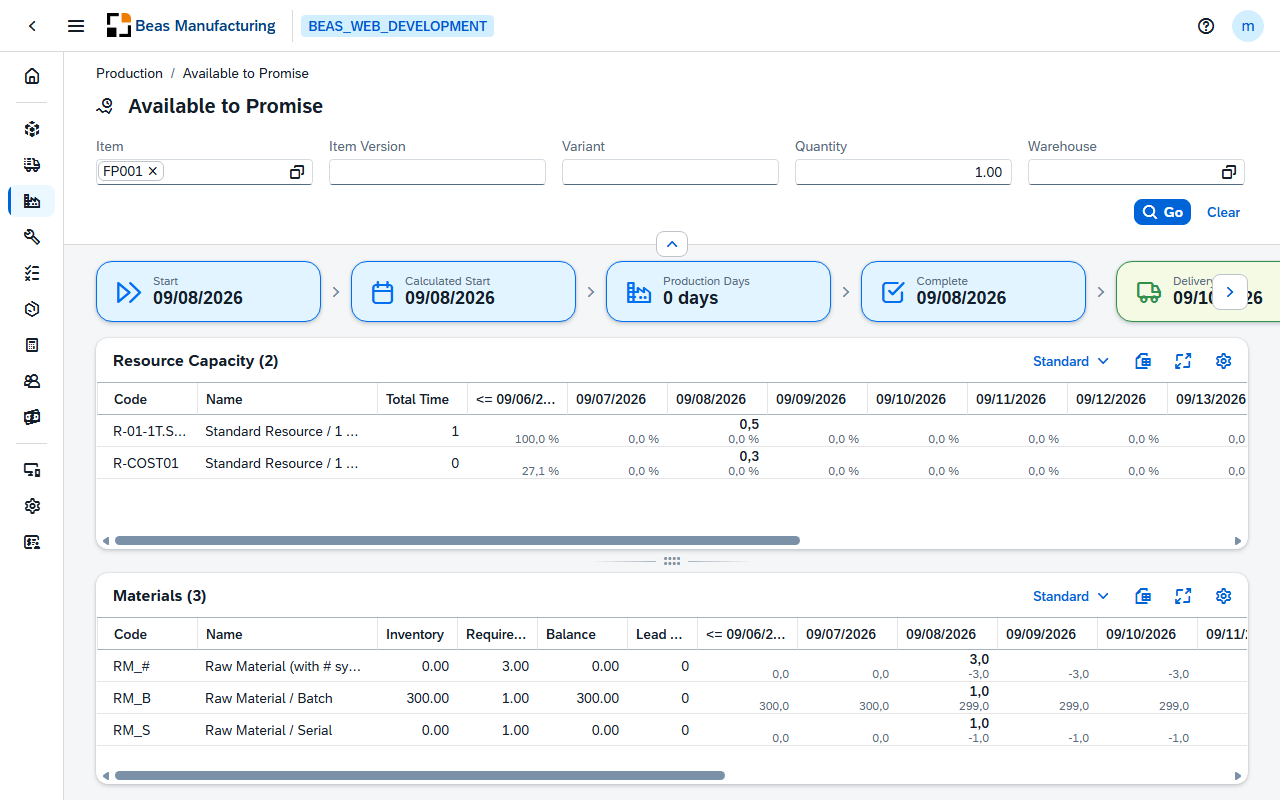
Parameters
| Field | Description |
|---|---|
| Item | The finished product to promise — one item, picked from a list that shows code, name, stock and material group. Required. |
| Item Version | The item version to simulate, for an item under version control. Empty uses the current version. |
| Variant | The planning variant to simulate, for a configurable item. |
| Quantity | How many to promise. Required, 1 by default. |
| Warehouse | The warehouse to deliver from. Empty follows the item's warehouse rule. |
The parameters are kept in the address of the page, so a simulation can be bookmarked or sent to a colleague.
Resource Capacity
One row per resource the item's operations need.
| Column | Description |
|---|---|
| Code | The resource. |
| Name | The resource's description. |
| Total Time | The total time the simulation needs on that resource. |
| Period columns | One per day, week or month, each holding two figures: the time planned on that resource in that period, and underneath it the share of the resource's capacity that represents. |
The color of each period column comes from the calculation, not from a threshold you set:
| Cell Color | Meaning |
|---|---|
| Green | Comfortable load — capacity available. |
| Yellow | Warning — load close to capacity. |
| Red | Overloaded — capacity exceeded; the resource is the bottleneck for this period. |
Materials
One row per component the production would consume.
| Column | Description |
|---|---|
| Code | The component. |
| Name | The component's description. |
| Inventory | The stock currently on hand. |
| Requirements | The total quantity the simulation would consume. |
| Balance | What is left once the requirement is taken off the stock. Red when negative — the component is short. |
| Lead Time | Days the component takes to arrive when it has to be procured. |
The period columns hold the quantity needed in that period on top and the running balance underneath. The running balance carries forward, so the first period where it turns red is when the shortage bites, and the component's lead time says how far ahead of that someone has to order.
How wide a period is follows how far ahead the simulation had to look: daily up to two weeks
(weekends skipped, the first column prefixed <=), weekly up to about fifteen weeks (year and
calendar week), monthly beyond that. Fifteen periods are shown at most. Both grids export to
Excel in full.
Examples
The delivery date is later than the customer will accept. A red period in Resource Capacity means capacity limits the date — another shift, or moving other work, pulls it in. A red Balance in Materials means a component limits it, and the fix is a purchase order. If both are clean, the date is production time plus lead times, and only a smaller quantity moves it.
Promising a partial quantity. Run the simulation for the full quantity, then for less. The figures scale with it, so two runs show how much can be promised for the original date.
Limitations
- One item at a time. For several products, run the simulation once per product.
- The material check reflects the last MRP run, not live stock. A goods receipt posted since then is not in the answer.
- The lead time comes from the item's default MRP settings, not from a supplier quotation.
- Variants, configurations and formulas in the bill of materials or the routing are not evaluated. Short variants and item versions are.
- Capacity other sales orders will need is only counted when a work order already exists for them.
- The result is not saved, and nothing links it to a sales order. A date you promise has to be recorded on the order yourself.
Related functionality
- Material Requirements — the live material situation, once the order is real
- Production Cockpit — what the resources are doing now
- Sales Order to Work Order — turning the promise into production