Work Order Bill of Materials
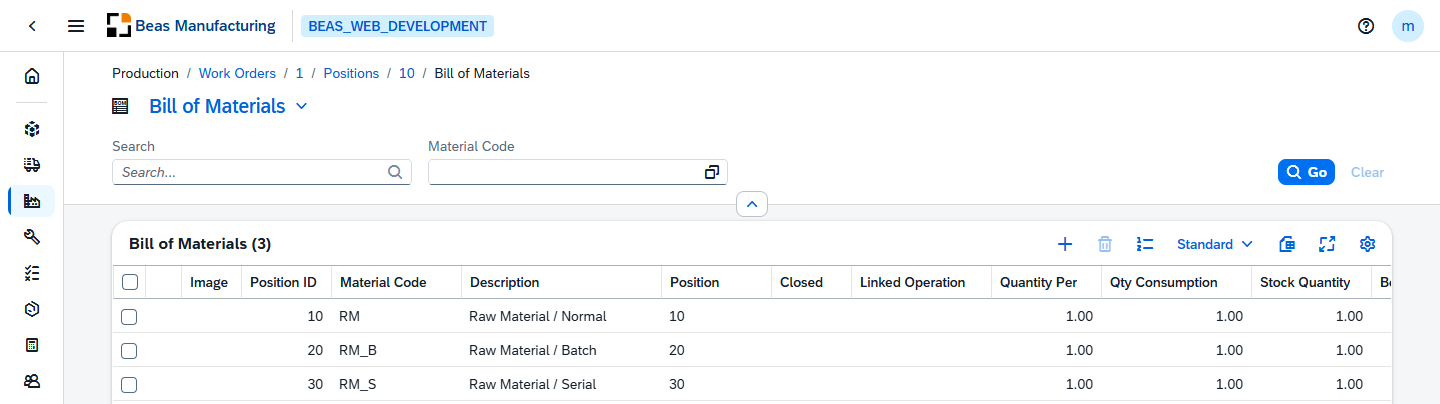
Press Bill of Materials in the WO Positions Detail header to see the components required by this position. There is one row per component, showing what is needed, what is in stock, and what has already been booked.
The list is the Work order's own copy of the Bill of materials. It is exploded from the item's Bill of Materials when the position is created, and can be changed afterwards without affecting the item's master data.
Actions
Two actions are specific to this list; the rest of the tool bar is the standard one.
| Action | Icon | Description |
|---|---|---|
| Renumber | Renumbers the whole list in the order it is in, closing the gaps left by deleted or inserted lines. Asks to confirm first, and is refused on a closed position. | |
| Reserve | A row action. Opens the reservation page of the position on that component line. Offered only to users whose permissions include the Work order reservation. See Reservations. |
Default Columns
| Field | Description |
|---|---|
| Image | Image or icon saved for the line. |
| Position ID | Internal identifier of the line within the position. |
| Material Code | The component's item number. |
| Description | The component's description. |
| Position | The line's position within the Bill of materials. |
| Closed | When enabled, the line is closed and no longer consumed. |
| Linked Operation | The routing operation that consumes this component, when one is assigned. |
| Quantity Per | Quantity of the component needed per unit of the produced item. |
| Qty Consumption | Quantity of the component consumed so far on this position. |
| Stock Quantity | Current stock of the component. |
| Booked Qty | Quantity already booked for this line. |
| Warehouse Code | The warehouse the component is issued from. |
Additional Columns
| Column | Description |
|---|---|
| Quantity | The entered quantity, in the input unit of measure. |
| Unit of Measure (Input) | The unit the entered quantity is expressed in. |
| Input Factor | Factor converting the input quantity to the warehouse unit. |
| Total | Total quantity required for the position, in the warehouse unit. |
| Unit of Measure (Warehouse) | The unit the component is stocked in. |
| Unit of Measure (Consumption) | The unit the component is consumed in. |
| Conversion factor | Factor between the consumption unit and the warehouse unit. |
| Scrap | Scrap quantity for the line. |
| Scrap % | Scrap expressed as a percentage. |
| Waste Qty | Waste quantity for the line. |
| Waste Qty (Warehouse Unit) | The same waste quantity, in the warehouse unit. |
| Don't Post Scrap | When enabled, scrap is not posted for this line. |
| Bin Code | The bin the component is issued from. See Bin Locations. |
| Length | The component's length. |
| Width / OD | The component's width, or outside diameter. |
| Height / ID | The component's height, or inside diameter. |
| Density | Density of the component's raw material. |
| Form | The raw material form of the component. |
| Planning Method | How the line is planned (Automatically or No). |
| Rounding Type | How the required quantity is rounded. |
| Rounding Decimals | Number of decimals the rounding uses. |
| Only Reservation Booking | When enabled, the line is only reserved and never posted. |
| Issue batch remains | Remaining quantity of an issued batch. |
| Delivery Date | The date the component is needed. |
| Provided | Marks the component as provided by the customer. |
| Version | The component's item version. |
| Drawing Number | The number of the technical drawing for the component. |
| Raw Material | The raw material the component is made of. |
| Match Code | Short code used to find and match the component. |
| Material Group | The material group the component belongs to. See Material Groups. |
| Barcode | Barcode of the line. |
| To Position | The last position of a position range. |
| Original Position | The position this line was copied from. |
| DIN | The component's DIN designation. |
| Phantom Assembly Group | The phantom assembly group the line belongs to. |
| Phantom Assembly Group Position | The line's position inside the phantom assembly group. |
| Phantom Assembly Group Quantity | Quantity contributed by the phantom assembly group. |
| Sort ID | Sort order of the line within the list. |
| Material Cost | Material cost of the line. |
| Marginal Cost Surcharge % | Marginal cost surcharge applied to the line. |
| Full Cost Surcharge % | Full cost surcharge applied to the line. |
| Project | The project the line belongs to. |
| Task | The project task the line belongs to. |
| Variant | The variant the line is active for. |
| Configuration | The configuration the line came from. |
| Best Before Date Option | Best-before-date handling for the line. |
| Color | Color assigned to the line. |
| Notes | Free text on the line. |
| Additional Information | Extra status information about the line. |