QC Blockage Reasons
A blockage reason is what an inspector records when something is held back during quality control — a damaged sample, a measurement that cannot be taken, a batch waiting for a decision. Each row is one reason, with the levels it may be selected at — the whole QC order, one sample or a single measurement position — whether it blocks the release of what carries it, and the period it is valid for. Reasons are applied to positions when entering results by sample; the QC Samples list then shows each one with the icon and colour set here.
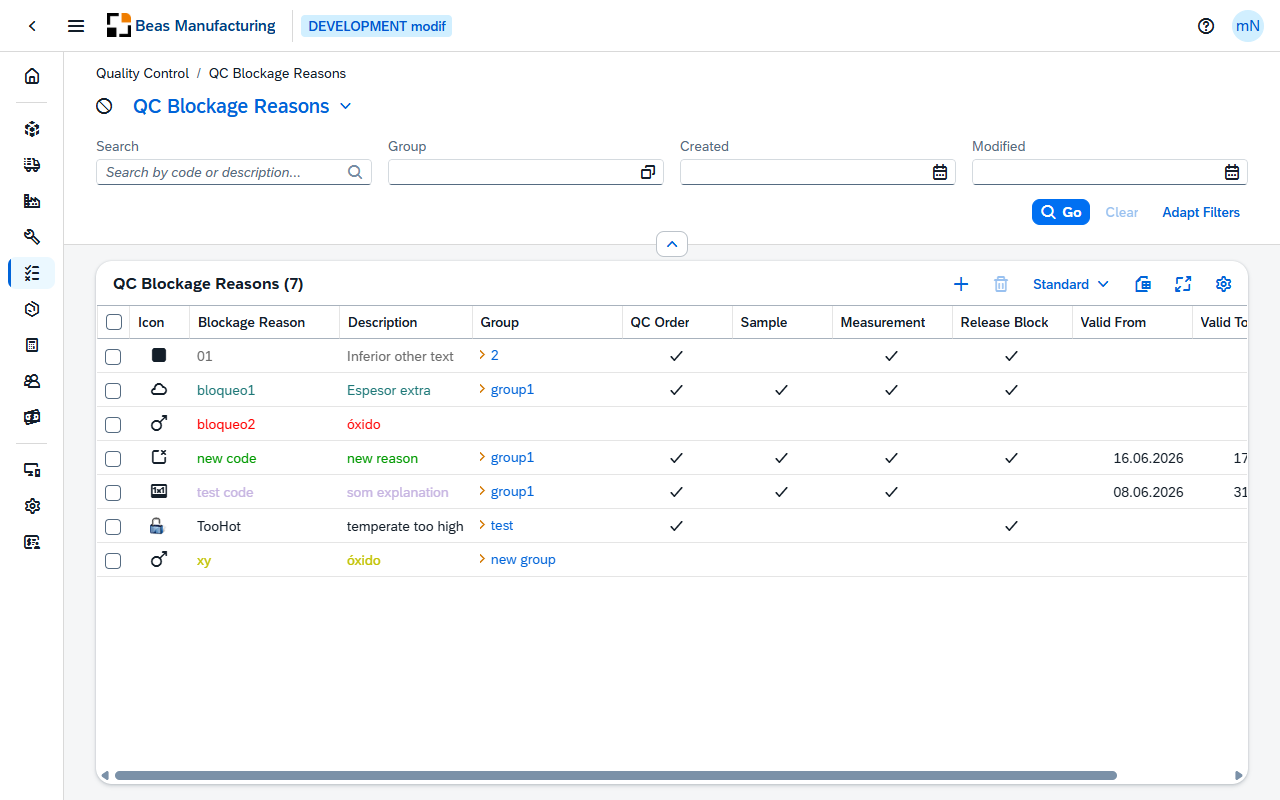
Default Columns
| Column | Description |
|---|---|
| Icon | The icon assigned to the reason. |
| Blockage Reason | The reason's code. It and the description are shown in the reason's colour. |
| Description | What the reason means to the person choosing it. |
| Group | The QC group the reason is filed under. Click the value to open the group. |
| QC Order | Check mark when the reason may be selected on a QC order. |
| Sample | Check mark when it may be selected on a sample. |
| Measurement | Check mark when it may be selected on a single measurement position. |
| Release Block | Check mark when a position carrying the reason cannot be released. |
| Valid From | First day the reason is meant to be in use. |
| Valid To | Last day it is meant to be in use. |
Additional Columns
Hidden columns are available in the tool bar settings ().
| Column | Description |
|---|---|
| Color | The color assigned to the reason. |
| Created | Date and time the reason was created. |
| Created By | User who created it. |
| Modified | Date and time it was last changed. |
| Modified By | User who last changed it. |
QC Blockage Reason detail
Open a row in the list to see one blockage reason. The page opens in display mode; press Edit to change it.
Header
The header shows the reason's code with its description beneath it, and the icon assigned to it.
| Field | Description |
|---|---|
| Last Modified | Date and time the reason was last changed. |
The action buttons:
| Field | Description |
|---|---|
| Duplicate | Opens a new reason pre-filled with this one's settings — everything except the code, which you enter for the copy. |
The form has four sections: General, Selectable, Validity and Appearance.
General
| Field | Description |
|---|---|
| Blockage Reason | The code that identifies the reason. It is entered when the reason is created and locked afterwards. Required. |
| Description | What the reason means to the person choosing it. Required. |
| Group | The QC group the reason is filed under. Choose one from the list; click the value to open the group. |
| Release Block | Whether the reason holds back release. A measurement position carrying such a reason cannot be released — neither by hand nor automatically — and the QC order is not released while one of its positions carries it. |
Selectable
The levels the reason may be selected at. A new reason starts with all three selected.
| Field | Description |
|---|---|
| QC Order | The reason may be selected on a QC order. |
| Sample | The reason may be selected on a sample. |
| Measurement | The reason may be selected on a single measurement position. |
Validity
| Field | Description |
|---|---|
| Valid From | First day the reason is meant to be in use. |
| Valid To | Last day it is meant to be in use. |
Appearance
| Field | Description |
|---|---|
| Icon | The icon shown for the reason — one of the SAP icons, one of the Beas icons, or an image of your own. On the QC Samples list it marks every sample the reason is applied to. |
| Color | The color the reason's code and description are shown in on lists, and the color of its icon on the QC Samples list. |
Examples
A position is OK, but it will not release. When entering results by sample, releasing a position is refused with a message naming its blockage reason. That reason has Release Block set: the position stays unreleased until the reason is removed or replaced by one without the flag, and the same flag keeps the whole QC order from being released while any position still carries it. Use Release Block for the reasons that genuinely stop a result from counting — a contaminated sample, an uncalibrated gauge — and leave it off for reasons that only explain a delay.
Retiring a reason that is already in use. A reason referenced by a QC order, a sample or a measurement cannot be deleted; the delete is refused with a message saying what references it. Set Valid To instead. The records that already carry the reason keep it, and the date records from when on the reason is no longer to be used.