QC Groups
The QC Groups list holds the groups quality control is organised by — dimensional checks, surface checks, documentation. One row is one group; its code and description are shown in the color assigned to it.
A group is named on a QC template, a QC valuation, a QC inspection plan and its measurement positions, and a QC blockage reason. It is what keeps those lists navigable once a company has a few hundred entries in each.
A group that is still in use cannot be deleted. Move the records that use it to another group first.
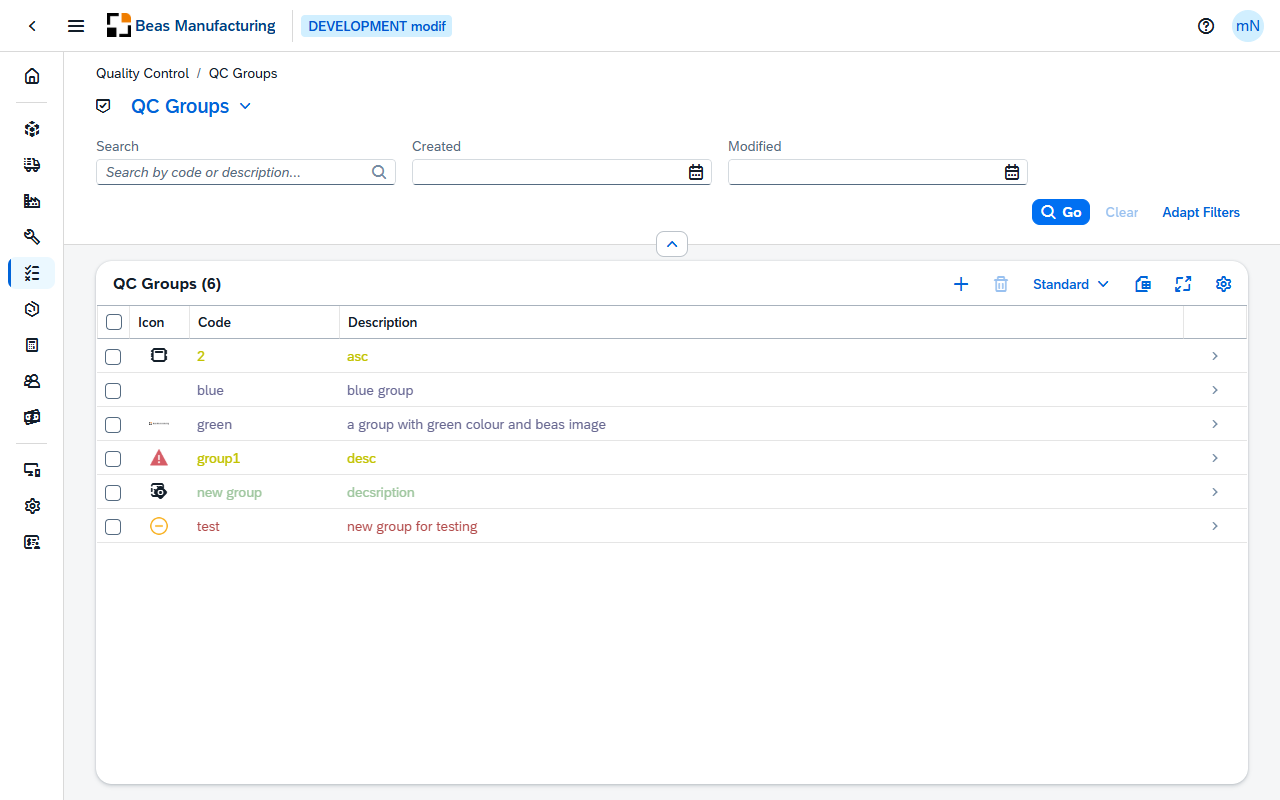
Default Columns
| Column | Description |
|---|---|
| Icon | The icon assigned to the group. |
| Code | The group's code. |
| Description | What the group covers. |
Additional Columns
Hidden columns are available in the tool bar settings ().
| Column | Description |
|---|---|
| Color | The colour assigned to the group — the one its code and description are shown in. |
| Created | Date and time the group was created. |
| Created By | User who created it. |
| Modified | Date and time it was last changed. |
| Modified By | User who last changed it. |
QC Group detail
Open a row in the list to see one group. The page opens in display mode; press Edit to change it.
Header
The header shows the group's code with its description beneath it, and the image assigned to it.
| Field | Description |
|---|---|
| Last Modified | Date and time the group was last changed. |
The action buttons:
| Field | Description |
|---|---|
| Duplicate | Opens a new group with this one's description, image and color filled in, ready for a new code. |
The form has two sections: General and Appearance.
General
| Field | Description |
|---|---|
| Group | Identifies the group, and is entered when it is created. Templates, valuations, inspection plans and blockage reasons reference it by this code. Required. |
| Description | What the group covers. Required. |
Appearance
| Field | Description |
|---|---|
| Image | The icon shown for the group — an SAP icon, a Beas icon or an image of your own. |
| Color | The color the group's code and description are shown in, in the list. |