QC Inspection Plans
The QC Inspection Plans list holds the plans that decide what quality control checks, and how often. One row is one plan, identified by its code, with the text describing it, the group it is filed under, the period it is valid for and whether it has been approved.
A plan's checks — its measurement positions — and its sampling rules and parallel plans are reached from the plan detail page, not from this list.
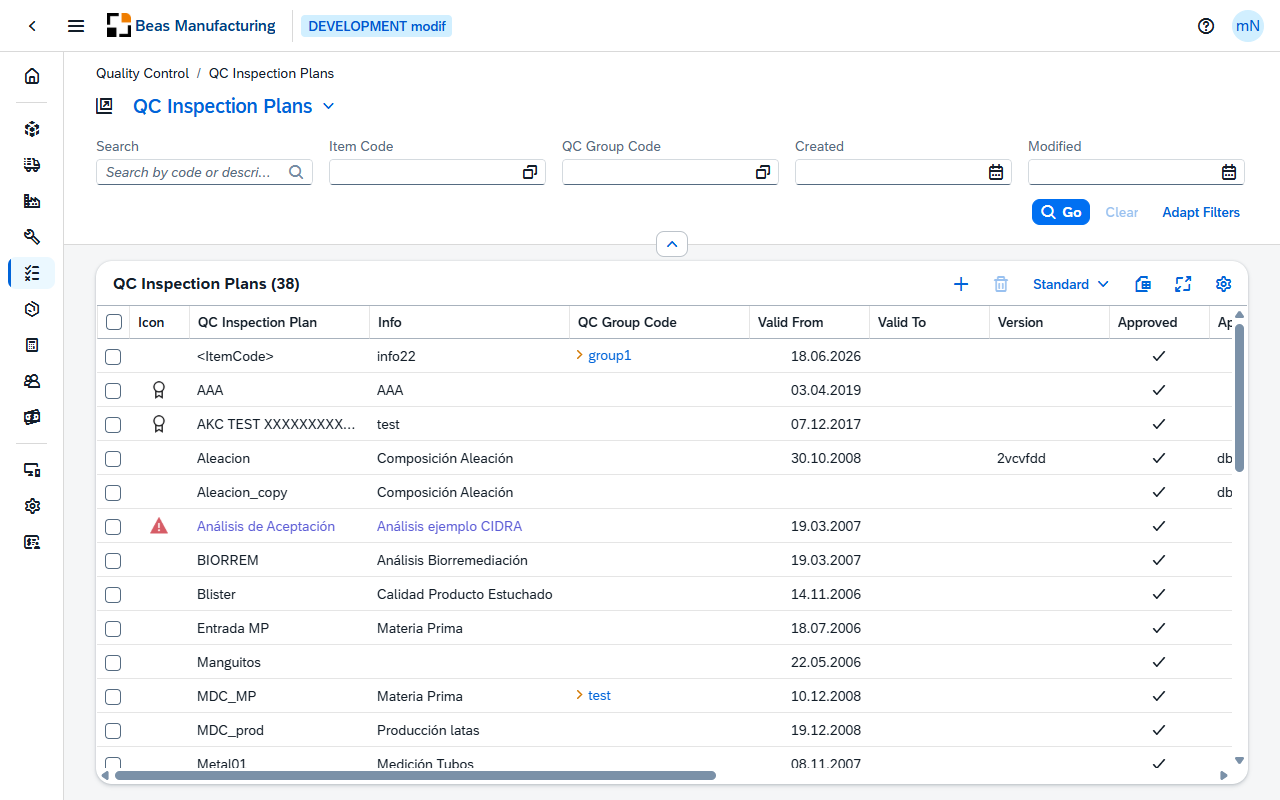
Default Columns
| Column | Description |
|---|---|
| Icon | The icon or picture assigned to the plan on its Appearance section. |
| QC Inspection Plan | The plan code. |
| Info | Free text describing the plan. |
| QC Group Code | The QC group the plan is filed under. Click the value to open the group. |
| Valid From | First day the plan applies. |
| Valid To | Last day it applies. |
| Version | The plan's version. |
| Approved | Check mark when the plan has been approved. |
| Approved From | The user who approved it. |
| Approved Date | Date and time it was approved. |
| Measurement All | Take a sample every n pieces. |
| By Series | Check mark when a sample is taken per serial number. |
| Reference | Check mark when this plan is itself linked as a parallel plan of another plan. |
| QC Plan 1 | The first parallel plan linked to this plan, in code order. |
| QC Plan 2 | The second parallel plan linked to this plan. Further parallel plans are listed on the detail page only. |
Additional Columns
Hidden columns are available in the tool bar settings ().
| Column | Description |
|---|---|
| Color | The colour assigned to the plan. It also colours the plan code and the Info text in the row. |
| Customer ID | The customer the plan is specific to, where one was recorded. Click the value to open the business partner. |
| Sample per Minutes | Take a sample every n minutes. |
| Input | How results are entered, shown as a code: 0 for All, 1 for Per Sample, 2 for Per Measurement Position. |
| Created | Date and time the plan was created. |
| Created By | User who created it. |
| Modified | Date and time it was last changed. |
| Modified By | User who last changed it. |
QC Inspection Plan detail
Open a row in the list to see one inspection plan. The page opens in display mode; press Edit to change the plan, its sampling rules or its parallel plans.
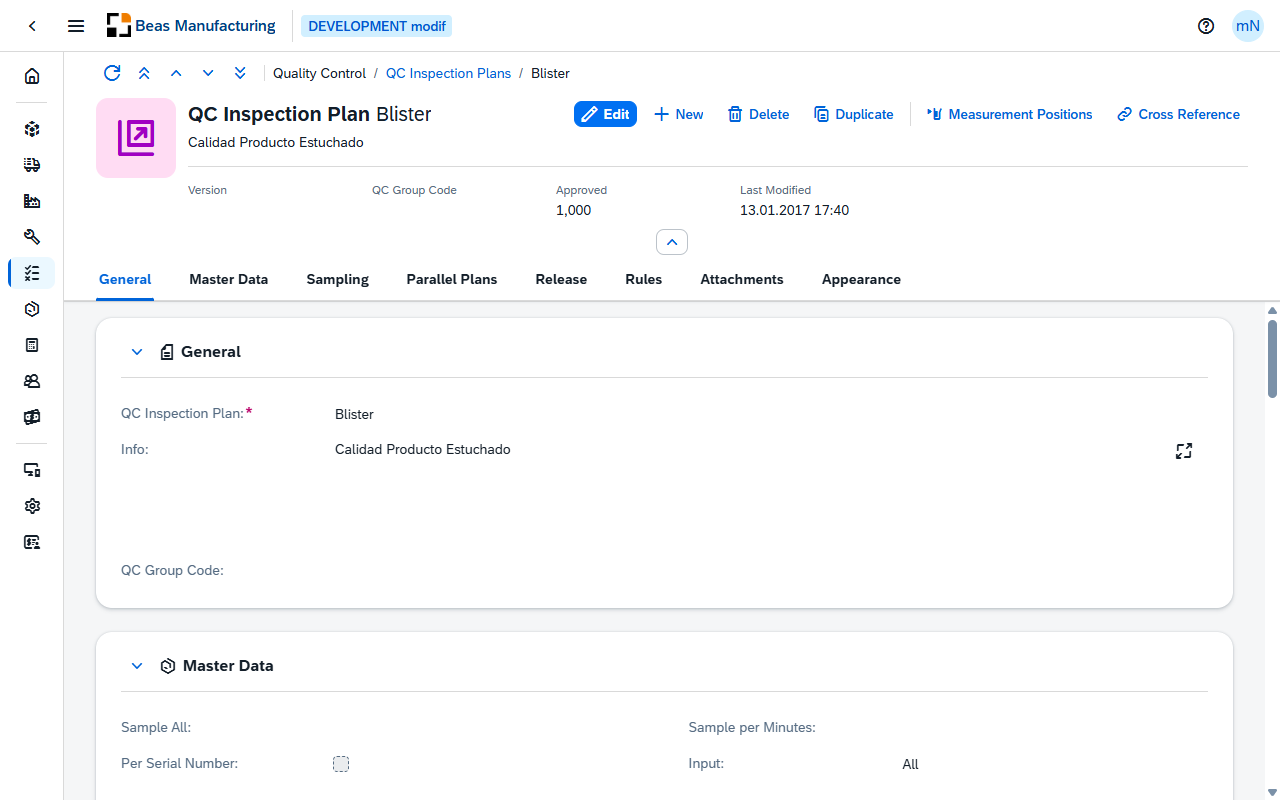
Header
The header shows the plan code with its Info text beneath it, and the plan's image when one is set on the Appearance section. The figures at a glance:
| Field | Description |
|---|---|
| Version | The plan's version. |
| QC Group Code | The QC group the plan is filed under. |
| Approved | 1 when the plan has been approved, otherwise 0. |
| Last Modified | Date and time the plan was last changed. |
The action buttons:
| Field | Description |
|---|---|
| Duplicate | Opens a new plan filled from this one, together with its measurement positions, sampling rules and parallel plans. The copy has no version and no approval — enter its code and save. |
| Measurement Positions | Opens the plan's measurement positions — the checks themselves. Shown once the plan exists. |
| Copy positions from plan | Shown only while a new plan is being entered. Choose an existing plan; its measurement positions — and nothing else — are picked up and saved together with the new plan. A message tells you how many positions were copied. If positions were already picked up, you are asked whether to replace them. |
| Cross Reference | Opens the plan's usage — see Cross Reference. Shown once the plan exists. |
Cross Reference
Cross Reference opens a dialog titled with the plan code. It answers the question you have to answer before changing or retiring a plan — where is it used — in up to five lists. A list appears only when it has entries; a plan used nowhere shows This plan is not referenced anywhere.
| Field | Description |
|---|---|
| Item Assignments | The items the plan is assigned to: Number, Item Code, Type, Business Partner, Warehouse, Date From, Date To, Quantity From and Quantity To. |
| Routing Operations | The routing operations that call the plan: Item Code, Position, Operation, Description and Resource. |
| Work Order Operations | The work order operations that call it: Work Order, Line, Position, Description, Resource and whether the operation is Closed. |
| Open QC Orders | The QC orders still open against the plan: QC Order, Number, Item Code and Description. |
| Used as Parallel Plan | The plans that run this one as a parallel plan: Item Code, Customer ID, Description, Business Partner, Rule, Date From and Date To. |
The form has nine sections: General, Master Data, Sampling, Parallel Plans, Release, Rules, Attachments, Custom Fields and Appearance.
General
| Field | Description |
|---|---|
| QC Inspection Plan | The plan code. Required, and set when the plan is created. |
| Info | Free text describing the plan, over several lines. |
| QC Group Code | The QC group the plan is filed under, with a choose-from-list of groups. |
Master Data
Main
How often the plan measures, and how results are entered.
| Field | Description |
|---|---|
| Sample All | Take a sample every n pieces. |
| Sample per Minutes | Take a sample every n minutes. |
| Per Serial Number | Whether a sample is taken per serial number. |
| Input | How results are entered: All, Per Sample or Per Measurement Position. A new plan starts with All. |
Release
The plan's own version and approval.
| Field | Description |
|---|---|
| Version | The plan's version. |
| Approved | Whether the plan has been approved. |
| Approved Date | When it was approved. |
| Approved From | The user who approved it. |
| Valid From | First day the plan applies. A new plan starts with today. |
| Valid To | Last day it applies. |
Sampling
Sample sizes by quantity band, edited directly in the grid while the page is in edit mode. The section reads No sampling rules defined until the first row exists.
| Field | Description |
|---|---|
| From Quantity | The quantity from which the row applies. Required. |
| Type | One sample per x pieces or Fixed sample count. A new row starts with One sample per x pieces. |
| Samples / Sample Size | How many — pieces per sample, or the fixed number of samples, according to Type. |
| Info | Free text for the row. |
Parallel Plans
Plans that run alongside this one, so that one inspection covers several plans. The grid is edited while the page is in edit mode and reads No parallel plans linked to this plan while it is empty.
| Field | Description |
|---|---|
| Parallel Plan | The code of the plan that runs alongside. Required; it must be an existing plan other than this one. |
| Description | That plan's description. |
| Business Partner | The business partner the pairing is limited to. |
| Rule | The rule that decides when the pairing applies. |
| Valid From | First day the pairing applies. |
| Valid To | Last day. It cannot be earlier than Valid From. |
Release
How much a person has to confirm by hand, at each level.
Sample
| Field | Description |
|---|---|
| Release | Automatically, Manually Only If OK or Always Manually. |
| Electronic Signature | Whether a signature is required. Available only with the release mode Manually Only If OK. |
| Valuation | Whether a valuation is recorded: No, Yes or Mandatory. Mandatory cannot be combined with an automatic release. |
QC Order
| Field | Description |
|---|---|
| Release | Automatically, Manually Only If OK or Always Manually. |
| Electronic Signature | Whether a signature is required, on the same condition as for a sample. |
| Valuation | No, Yes or Mandatory, with the same restriction as for a sample. |
| Transfer / Batch Release | Manually or Mandatory. |
| Close Order Automatic | Automatically, Manually If OK or Manually Without Check. |
Batches & Transfer
| Field | Description |
|---|---|
| Batch Status Release | Manually, Automatically or Manually Only By Release. |
| Transfer | Only From QC Warehouse or From All Warehouses. |
| Transfer Release | Always or Only By Release. |
Rules
| Field | Description |
|---|---|
| Type Name | The name of the rule type. |
| Type Values | The values the rule allows, one per line. |
| Type SQL | The SQL behind the rule. |
Attachments
Up to three pictures kept with the plan, dropped or chosen into the field. They are stored in the SAP Business One picture folder, so the desktop client shows the same pictures.
| Field | Description |
|---|---|
| Image 1 | First picture. |
| Image 2 | Second picture. |
| Image 3 | Third picture. |
Custom Fields
The section appears only when the administrator has configured at least one field for QC Inspection Plans under System → UDF Configuration; the fields, their labels and their types are the ones configured there.
Appearance
| Field | Description |
|---|---|
| Image | The icon shown for the plan, chosen from the SAP icons, the Beas icons or an image of your own. It also replaces the default picture in the header. |
| Color | The colour applied to the plan code and Info text in the list. |
Examples
Two settings decide the signature, and one of them is unavailable until the other is right. Electronic Signature can only be switched on while Release is Manually Only If OK, and Valuation set to Mandatory cannot be combined with an automatic release. Set Release first, then the two beside it — on the Sample group and on the QC Order group alike.
A plan changed under everyone's feet. Before editing an approved plan, open Cross Reference: Open QC Orders lists the inspections running against it right now, and the other four lists show which items, routing operations, work order operations and other plans point at it. To replace such a plan, press Duplicate: the copy carries the measurement positions, the sampling rules and the parallel plans, but no version and no approval, so the successor starts clean while the plan in flight stays as it is.
Copy positions from plan is not Duplicate. Duplicate copies everything from the plan you are looking at into a new one. Copy positions from plan is only offered while a new plan is being entered, lets you pick any plan, and takes its measurement positions and nothing else — the sampling rules, release rules and approval of the new plan are yours to fill in.