Input by Test
Input by Test is the result-entry page of a QC order organised by check rather than by sample. The upper grid lists the measurement positions of the inspection plan once; the lower grid shows the selected position for every sample of the order, one row per sample. It suits an inspector who takes the same measurement on every sample in turn. Open it from the QC Orders list: select exactly one order and press Input by Test in the grid toolbar (the button is enabled only while one order is selected). As on Input by Sample, there is no Edit or Save button — each change is saved the moment you leave the cell.
The two grids sit one above the other. Drag the divider between them to give either more room.
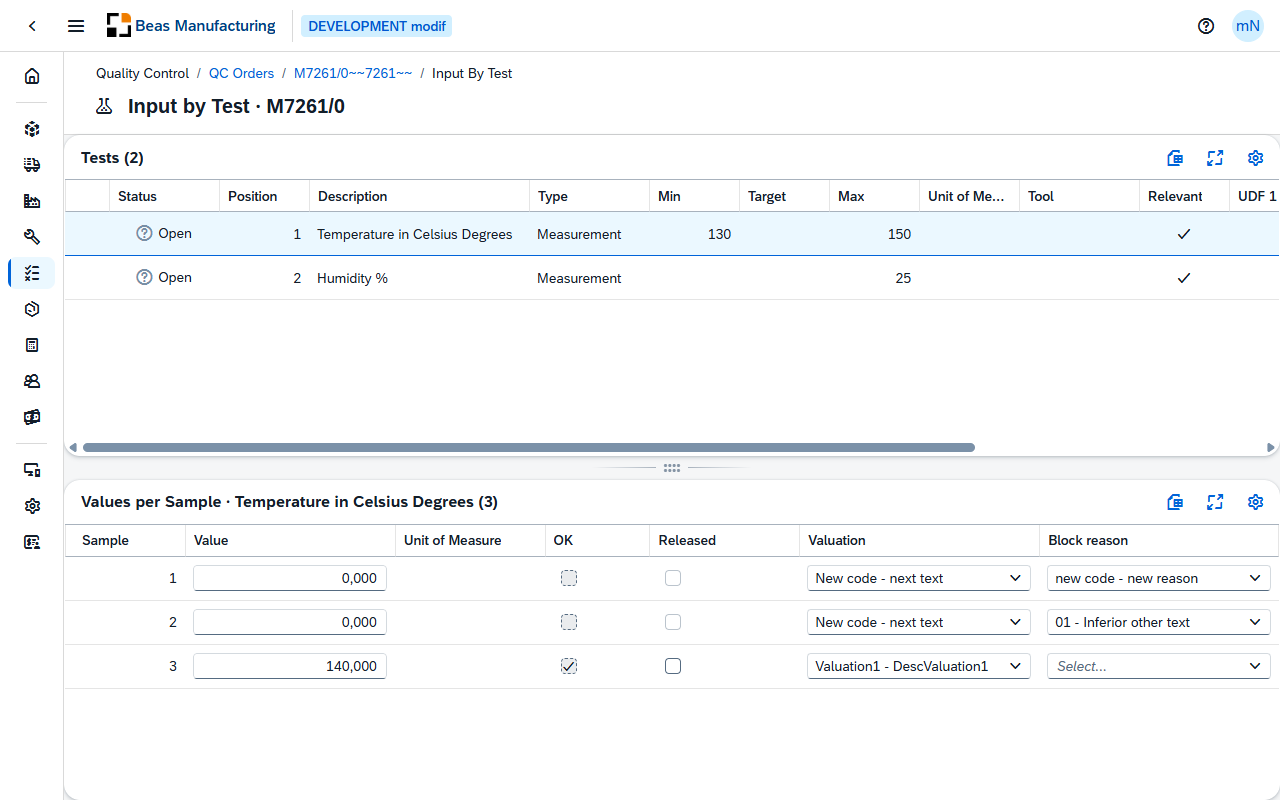
Tests
One row per measurement position of the order. The first position is selected when the page opens; select another to load its sample rows below.
| Column | Description |
|---|---|
| Status | The state of the check across all samples: Released when every sample row is released, First Release when at least one sample waits for its final release, Cancelled when at least one sample was cancelled or locked, otherwise Open. |
| Position | The position number of the check in the inspection plan. |
| Description | The description of the check. |
| Type | The type of input: Measurement, Attribute or Text. |
| Min | Lowest acceptable value. |
| Target | The value the check aims at. |
| Max | Highest acceptable value. |
| Unit of Measure | The unit the values are expressed in. |
| Tool | The test tool the measurement is taken with. |
| Relevant | Check mark when the position counts towards the release of the sample. |
| UDF 1 / UDF 2 / UDF 3 / UDF 4 | The first four free fields of the plan position. |
An order without measurement positions shows This QC order has no measurement positions. in place of the grids.
Values per Sample
The grid is titled Values per Sample followed by the description of the selected check. One row per sample of the order. Enter the value, choose the valuation and the block reason, and tick OK or Released where the row allows it. A change the server refuses is reported and the cell returns to its stored value.
| Column | Description |
|---|---|
| Sample | The sample's number within the order. |
| Value | The measured result of this sample. What you can enter follows the check's Type: a number for a Measurement, one of the plan's Attribute values for an Attribute, free text for a Text check. |
| Unit of Measure | The unit the value is expressed in. |
| OK | Whether the result passes. For a Measurement the box follows the value — ticked when it lies between Min and Max, cleared otherwise; a position with both limits at 0 has no tolerance and any value passes. You can tick or clear the box by hand only when the plan position has Manual OK set and the row is not yet released. Clearing OK also withdraws an existing release. |
| Released | The release of this sample's result for the selected check. The box is enabled once OK is ticked. The user who releases must differ from the user who entered the value (four-eyes principle); a position with Auto-release on the plan releases itself the moment its result is OK. Clear the box to withdraw the release. |
| Valuation | The valuation of this result, chosen from the QC Valuations; the grid shows its description. Clear the field to remove it. |
| Blockage reason | Why the result is blocked, chosen from the QC Blockage Reasons; the grid shows its description. A reason with Release Block set stops the result from being released. |
A closed order locks the whole grid, and This QC order is closed — values are read-only. appears above it. On an open order, a row that is already released shows its value, valuation and block reason as plain text — clear Released first to change them. A row whose sample has reached First Release or Released still looks editable, but the save is refused and the value snaps back; the release stage of a sample is shown, and its final release given, on Input by Sample.
Examples
A value snaps back after you leave the cell. The server refused the save, and the message names the cause: the sample is already at First Release or Released, the entry is not a number on a Measurement check, or a release was ticked by the same user who entered the value (four-eyes principle). Fix the cause and enter the value again — nothing is stored until a save goes through.
Status says First Release while a row is still open. A sample reaches First Release when every position marked Relevant is OK and released. A check that is not Relevant can therefore stay open on a sample that is already at First Release — and, since that sample no longer takes input, the row cannot be completed here. Whether a check counts is set on the plan position.