QC Samples
The QC Samples list shows the samples of every open quality-control order in one place. A sample is one unit of a QC order that has to be checked; depending on the inspection plan, an order has one sample or several. One row is one sample, with the item, order, batch and inspection plan it belongs to, how many of its measurement points are still untested, faulty or waiting for release, and the blockage reason and valuation applied to it.
Samples of closed QC orders are not listed. Measurements are recorded and samples are released on the order's Input by Sample page; this list is where you find a sample and see where it stands.
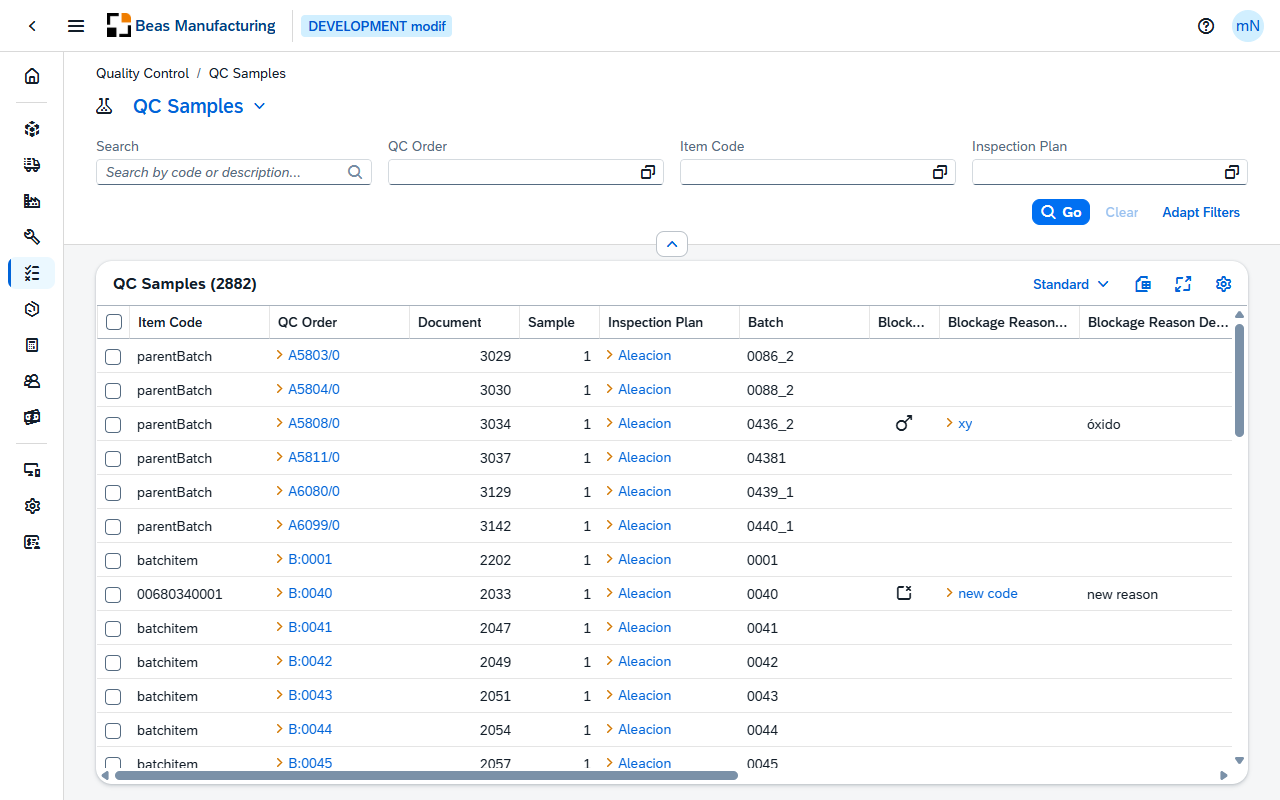
Default Columns
| Column | Description |
|---|---|
| Item Code | The item being inspected. |
| QC Order | The quality-control order the sample belongs to. Click the value to open the order. |
| Document | The document entry of the QC order. |
| Sample | The sample's number within its QC order. |
| Inspection Plan | The inspection plan the QC order follows. Click the value to open the plan. |
| Batch | The batch being inspected. |
| Blockage Reason Icon | The icon set on the reason in QC Blockage Reasons. Where the reason has no icon, a dot in the reason's color. Empty when no reason is applied. |
| Blockage Reason Code | The code of the blockage reason applied to the sample. Click the value to open the reason. |
| Blockage Reason Description | The description of that blockage reason. |
| Valuation | The icon set on the valuation in QC Valuations. Where the valuation has no icon, a dot in its color. |
| Valuation Text | The description of the valuation assigned to the sample. |
| Untested | Measurement points still open on the sample — relevant, not released and not blocked. |
| Faulty | Measurement points with a faulty result — not OK, carrying a blockage reason and not released. |
| To Release | Measurement points with an OK result that are not yet released. |
| Release 1 | The release state of the sample, as an icon and a label. See Release 1. |
| Last Change | Date and time a measurement point of the sample was last changed. |
Additional Columns
Hidden columns are available in the tool bar settings ().
| Column | Description |
|---|---|
| Type | The type of the QC order the sample belongs to. |
| Released | Check mark when the sample has been released. |
| Description | Free-text information held on the QC order. |
| Distribution Number | The batch or serial number recorded on the sample itself. |
| Release Person ID | ID of the person who released the sample. |
| Released By | Name of the person who released the sample. |
| Release Station | Station from which the sample was released. |
| Release Date | Date and time the sample was released. |
| Created | Date and time the sample was created. |
| Created By | User who created the sample. |
| Modified | Date and time the sample was last modified. |
| Modified By | User who last modified the sample. |
Release 1
Release 1 is the sample's release state. It is derived in this order: a released sample is Released whatever else applies; otherwise a blockage reason with Release Block set makes it Blocked; otherwise at least one faulty measurement point makes it Error; a sample with none of these is Open.
| Label | Meaning | Indicator |
|---|---|---|
| Released | The sample has been released. | Green check mark |
| Blocked | A blockage reason with Release Block is applied to the sample. | Red lock |
| Error | Faulty is greater than 0. | Orange warning triangle |
| Open | None of the above. | Gray clock |
Examples
A sample is missing from the list. Its QC order is closed. Closed orders and their samples are not shown here; find the order in QC Orders.
A sample shows Blocked although every point is OK. The blockage reason applied to the sample has Release Block set in QC Blockage Reasons. Until that reason is removed or replaced, the sample cannot be released — no matter what the points say.
A sample shows Error but its Blockage Reason Code is empty. Error comes from the measurement points, not from the sample: Faulty counts points that failed and carry a blockage reason of their own. Open the order's Input by Sample page to see which point failed.