QC Templates
The QC Templates list holds the individual checks quality control is built from — a diameter to measure, a surface to judge, a certificate to confirm. One row is one check, with the group it is filed under and the kind of answer it expects. The code and description of each row are shown in the color assigned to the template.
A template says what is checked and how the answer is entered. Where and when it is checked is decided by the inspection plan whose measurement positions use it.
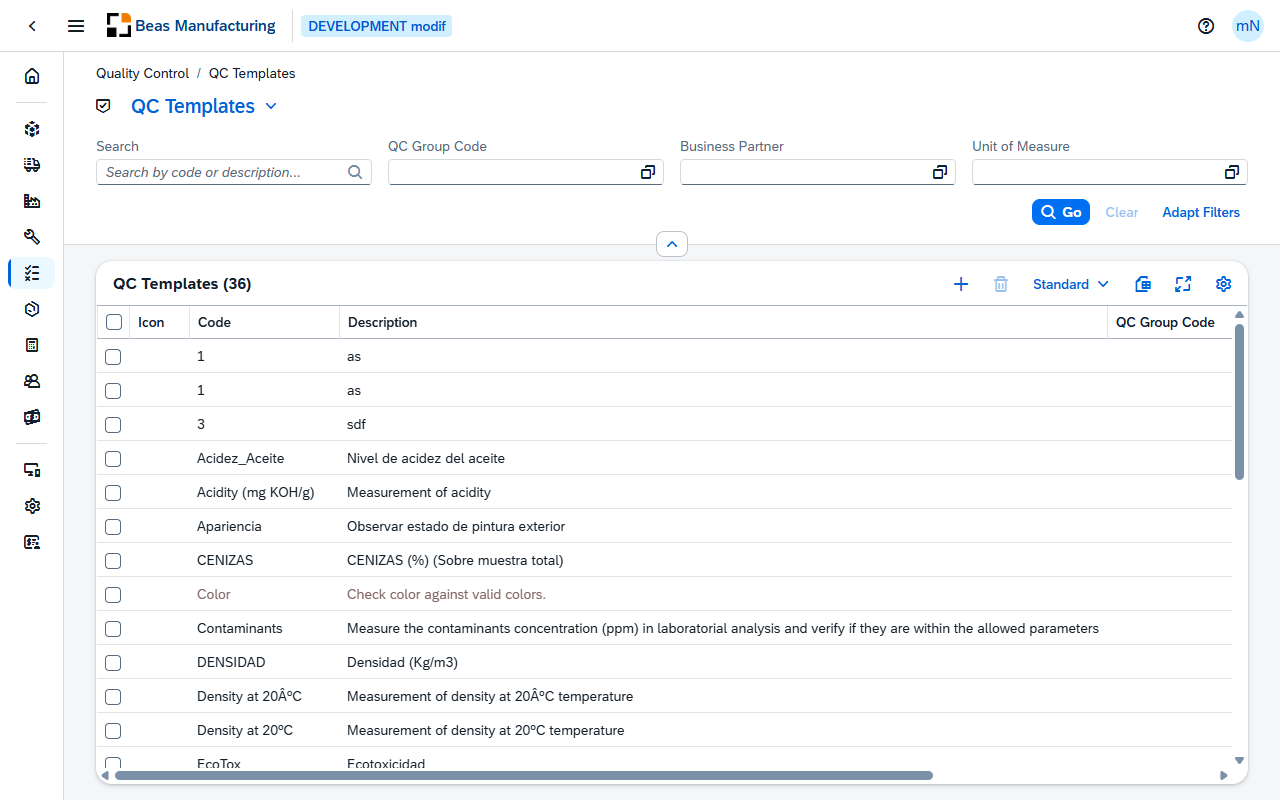
Default Columns
| Column | Description |
|---|---|
| Icon | The icon assigned to the template. |
| Code | The template's code. |
| Description | What is being checked. |
| QC Group Code | The QC group the template is filed under. Click the value to open the group. |
| Type | The kind of answer the check takes: Measurement, Attribute or Text. |
| Relevant | Check mark when the check counts towards the release decision. |
| Check mark when the check is printed. |
Additional Columns
Hidden columns are available in the tool bar settings ().
| Column | Description |
|---|---|
| Color | The color assigned to the template — the one its code and description are shown in. |
| Tool | The tool the measurement is taken with. |
| Unit of Measure | The unit a measured value is expressed in. Click the value to open the unit. |
| Rule | The rule applied to the check. |
| Business Partner | The business partner the check belongs to. Click the value to open the business partner. |
| Condition | The condition under which the check applies. |
| Attribute Selection | The values an attribute check offers. |
| Created | Date and time the template was created. |
| Created By | User who created it. |
| Modified | Date and time it was last changed. |
| Modified By | User who last changed it. |
QC Template detail
Open a row in the list to see one template. The page opens in display mode; press Edit to change it.
Header
The header shows the template's code with its description beneath it, and the icon assigned to it.
| Field | Description |
|---|---|
| Type | The kind of answer the check takes — Measurement, Attribute or Text. |
| QC Group Code | The QC group the template is filed under. |
| Tool | The tool the measurement is taken with. |
| Last Modified | Date and time the template was last changed. |
The action buttons:
| Field | Description |
|---|---|
| Duplicate | Opens a new template with this one's values filled in, ready for a new code. |
The form has six sections: General, Type of Input, Settings, Script, Custom Fields and Appearance.
General
| Field | Description |
|---|---|
| Code | Identifies the check, and is entered when the template is created. Inspection plans reference it by this code. Required. |
| Description | What is being checked, in the words the inspector will read. Several lines are allowed. |
| QC Group Code | The QC group the check is filed under. Click the value to open the group. |
| Relevant | Whether the check counts towards the release decision. Switched off and locked for a Text template — a text entry is information only and never blocks a release. |
| Whether the check is printed. | |
| Tool | The tool the measurement is taken with. |
| Rule | The rule applied to the check. |
| Business Partner | The business partner the check belongs to, where it exists for one supplier or customer only. |
| Condition | The condition under which the check applies — compared with the answer given on the inspection plan's rules when a QC order is created. |
Type of Input
Type decides which of the other fields are shown, so set it first. A new template starts as Measurement.
| Field | Description |
|---|---|
| Type | Measurement for a value to measure, Attribute for a choice from a list of values, Text for a free-text entry. Required. |
| Attribute Selection | The values an attribute check offers. Shown for Attribute only. |
| Unit of Measure | The unit the measured value is expressed in. Shown for Measurement only. |
| Manual Release | Whether a measured result has to be released by hand. Shown for Measurement only. |
| Release Automatic | Whether a measured result is released automatically. Shown for Measurement only. |
Changing Type discards the inputs the new type does not use when you save — the unit of a measurement, or the values of an attribute selection.
Settings
| Field | Description |
|---|---|
| Only All PO Receipt | Check only every n-th purchase-order receipt. |
| Only All Measured Position | Check only every n-th measured position. |
| Always After Error | Whether the check is always made after an error. |
Script
| Field | Description |
|---|---|
| Script | The script run for the check. |
Custom Fields
The user-defined fields set up for QC Templates in UDF Configuration — up to four, with the labels given there — together with any custom fields defined for the entity. The section appears only when at least one such field is set up.
Appearance
| Field | Description |
|---|---|
| Icon | The icon shown for the template — an SAP icon, a Beas icon or an image of your own. |
| Color | The color the template's code and description are shown in, in the list. |
Examples
The unit — or the attribute values — vanished after saving. The template's Type was changed. Each type owns its own inputs, and the ones the new type does not use are cleared on save: Unit of Measure is kept only for a Measurement, Attribute Selection only for an Attribute, and a Text template additionally has Relevant switched off. Set Type first, then fill in the fields it shows.