QC Valuations
A valuation is the verdict an inspector records on what was checked — accepted, rejected, to be reworked, or whatever verdicts your company works with. Each row is one verdict, with the QC group it is filed under, the levels it may be given at — the whole QC order, one sample or a single measurement position — and the period it is valid for. Verdicts are given to positions when entering results by sample; the QC Samples list then shows each sample's valuation with the icon and colour set here.
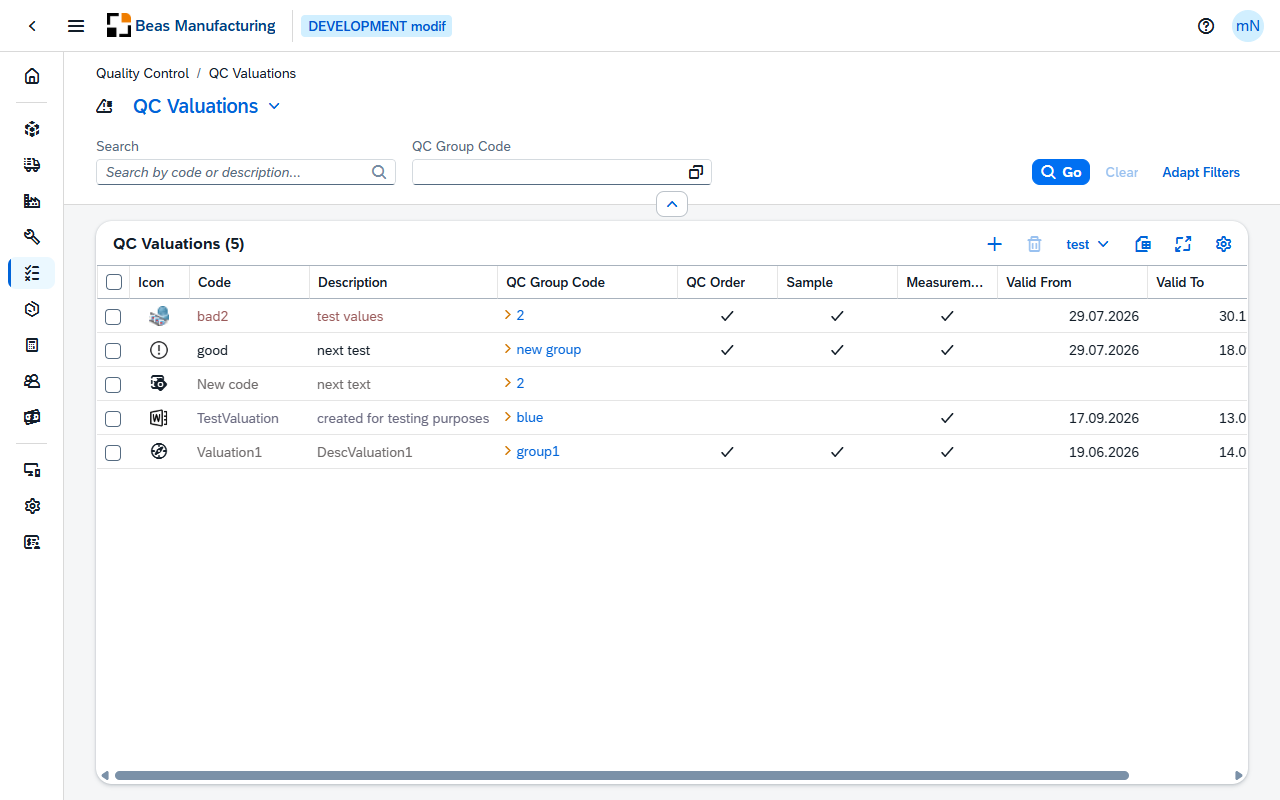
Default Columns
| Column | Description |
|---|---|
| Icon | The icon assigned to the verdict. |
| Color | The color assigned to the verdict. Its code and description are shown in it. |
| Code | The verdict's code. |
| Description | What the verdict means to the person choosing it. |
| QC Group Code | The QC group the verdict is filed under. Click the value to open the group. |
| QC Order | Check mark when the verdict may be given on a QC order. |
| Sample | Check mark when it may be given on a sample. |
| Measurement | Check mark when it may be given on a single measurement position. |
| Valid From | First day the verdict is meant to be in use. |
| Valid To | Last day it is meant to be in use. |
Additional Columns
Hidden columns are available in the tool bar settings ().
| Column | Description |
|---|---|
| Created | Date and time the verdict was created. |
| Created By | User who created it. |
| Modified | Date and time it was last changed. |
| Modified By | User who last changed it. |
QC Valuation detail
Open a row in the list to see one verdict. The page opens in display mode; press Edit to change it.
Header
The header shows the verdict's code with its description beneath it, the icon assigned to it, and three facts at a glance:
| Field | Description |
|---|---|
| QC Group Code | The QC group the verdict is filed under. |
| Valid From | First day the verdict is meant to be in use. |
| Last Modified | Date and time the verdict was last changed. |
The action buttons:
| Field | Description |
|---|---|
| Duplicate | Opens a new verdict pre-filled with this one's settings — everything except the code, which you enter for the copy. |
The form has four sections: General, Selectable, Area of Validity and Appearance.
General
| Field | Description |
|---|---|
| Code | The code that identifies the verdict. It is entered when the verdict is created and locked afterwards. Required. |
| Description | What the verdict means to the person choosing it. |
| QC Group Code | The QC group the verdict is filed under. Choose one from the list; click the value to open the group. |
Selectable
The levels the verdict may be given at. A new verdict starts with all three selected.
| Field | Description |
|---|---|
| QC Order | The verdict may be given on a QC order. |
| Sample | The verdict may be given on a sample. |
| Measurement | The verdict may be given on a single measurement position. |
Area of Validity
| Field | Description |
|---|---|
| Valid From | First day the verdict is meant to be in use. |
| Valid To | Last day it is meant to be in use. |
Appearance
| Field | Description |
|---|---|
| Icon | The icon shown for the verdict — one of the SAP icons, one of the Beas icons, or an image of your own. On the QC Samples list it marks every sample given this verdict. |
| Color | The color the verdict's code and description are shown in on lists, and the color of its icon on the QC Samples list. |
Examples
The same verdict at three different levels. QC Order, Sample and Measurement are independent switches, so one code can be a verdict on all three levels or on just one. Use them to keep the kinds of decision apart: "release the batch" is an order-level verdict, "this dimension is out of tolerance" a measurement-level one, and a verdict that carries both flags reads as either. Give each verdict only the levels where it makes sense, and the catalog says at a glance which decisions belong to a whole order and which to a single dimension.