Item Master Data
On the SAP Business One Item Master Data screen, Beas adds an Advanced Production tab that gathers the item's production settings into named groups, and an Advanced Production button in the header that jumps to the item's Beas screens.
Without the extension these settings are still on the item, but scattered and shown under their technical names. The extension names them, groups them the way Beas does, and shows only the ones that apply to the item at hand.
These are the item's production master data — the same values the Beas Web Client shows on the Items detail page and the Beas desktop client shows on the item's production tabs. One set of data, three places to look at it.
Header
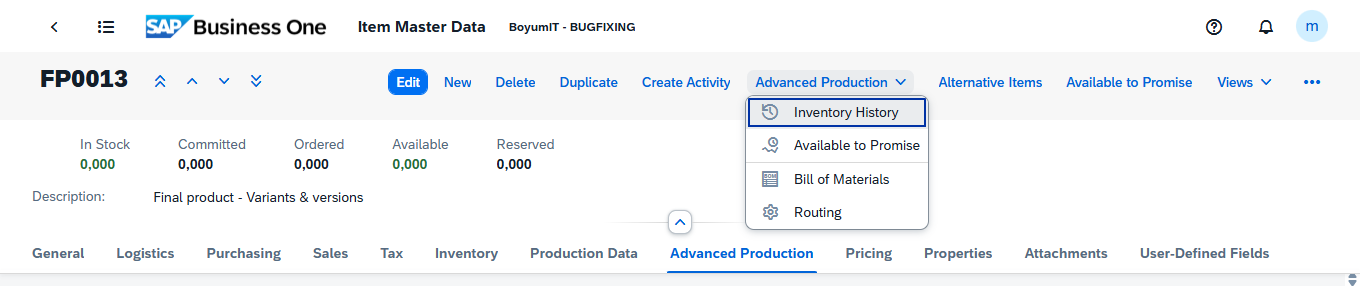
Beas adds a Reserved figure to the stock row, next to SAP's own In Stock, Committed, Ordered and Available, and an Advanced Production button to the row of actions.
| Field | Description |
|---|---|
| Reserved | The quantity of this item currently reserved for production. Display-only. |
| Advanced Production | Menu button. Its entries open the matching Beas screen in a new browser tab, already filtered to this item. |
Advanced Production
| Field | Description |
|---|---|
| Inventory History | Opens Inventory History for this item. |
| Available to Promise | Opens Available to Promise for this item. |
| Bill of Materials | Opens the item's Bill of Materials. |
| Routing | Opens the item's Routing. |
This is the fastest way from an item to its bill of materials or its routing. The button carries the item and the company with it, so the Beas screen opens on the right record without searching.
Body
Advanced Production
The tab shows the item's production settings in groups. Which fields and groups appear depends on the item itself.
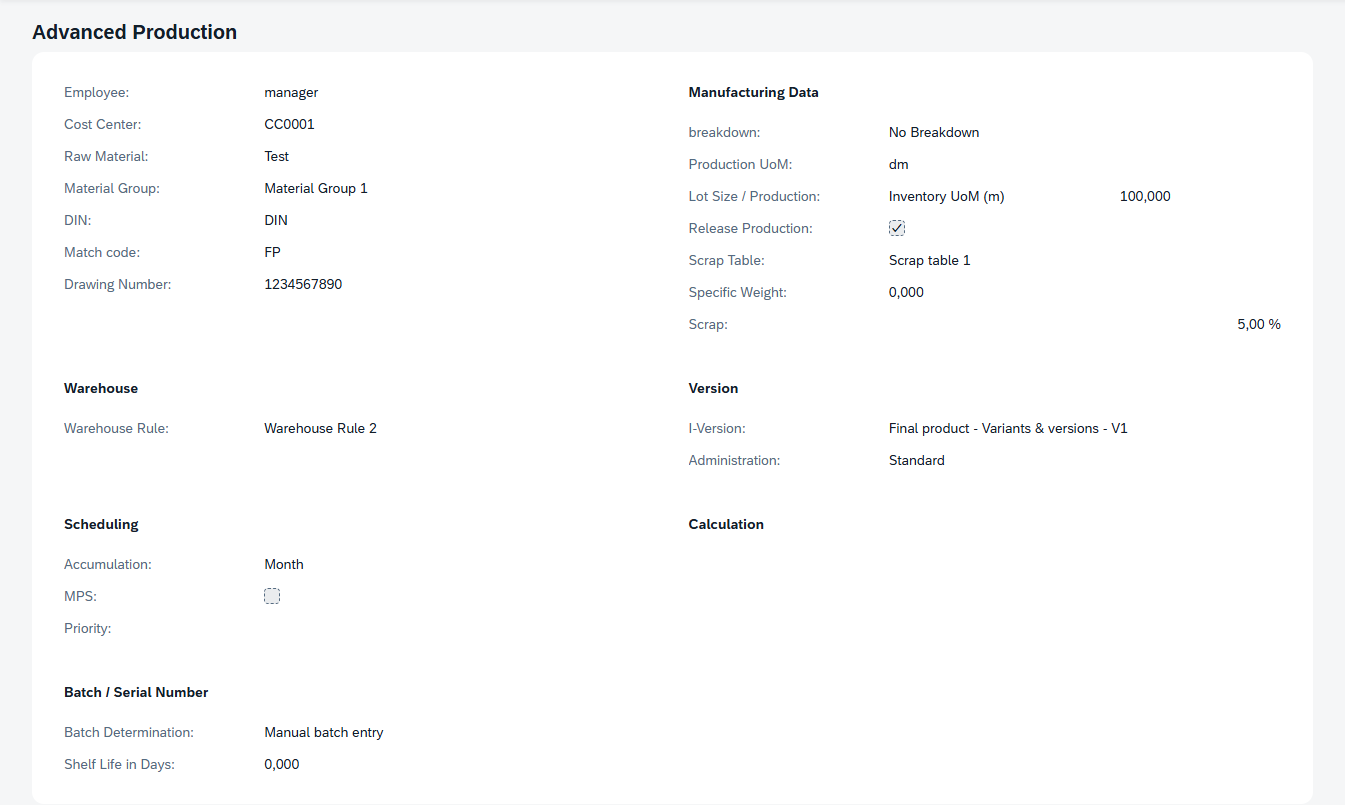
The dropdowns are display-only: they show the stored setting in a readable form instead of the code behind it. The plain input fields can be changed here and saved with the item; everything else is maintained in Beas — see Items - Detail.
General
| Field | Description |
|---|---|
| Employee | The employee responsible for the item. |
| Cost Center | The cost center the item's production is booked to. |
| Raw Material | Marks the item as a raw material. |
| Material Group | The material group the item belongs to. See Material Groups. |
| DIN | The item's DIN designation. |
| Match code | A short code used to find and match the item. |
| Drawing Number | The number of the technical drawing for the item. |
Manufacturing Data
| Field | Description |
|---|---|
| Breakdown | How the item is handled when it appears as a component in a bill of materials. |
| Production UoM | The unit of measure the item is produced in, when it differs from the inventory unit. |
| Lot Size / Production | The production lot size: a quantity, plus the unit it is expressed in. The unit list is built from the item's inventory unit of measure and, when one is set, its production unit; each entry names the unit code, and the list is rebuilt as soon as either of the two changes. With neither set the list is empty. |
| Release Production | Marks the item as released for production. |
| Scrap Table | The scrap table applied to the item. |
| Specific Weight | The item's specific weight. |
| Scrap | The scrap allowance for the item, as a percentage. |
Which Breakdown list you see follows the item's procurement method. A Make item offers No Breakdown, Storage Related, Order Related and Phantom Assembly Group; a Buy item offers No Breakdown and Provision Related.
Warehouse
| Field | Description |
|---|---|
| Warehouse Rule | The rule that decides which warehouse the item is issued from and received into. |
Version
| Field | Description |
|---|---|
| I-Version | The item's current version. |
| Administration | How versions are administered for this item: Standard, Extended View, or Separate Bill of Materials. |
Scheduling
| Field | Description |
|---|---|
| Accumulation | The period requirements for this item are accumulated over: Detail, Day, Week, Month, or Total. |
| MPS | Marks the item as part of the master production schedule. |
| Priority | The item's planning priority. |
Calculation
Shown for manufactured items only — items whose procurement method is Make. On a purchased item the calculation settings do not apply and the group's fields are not displayed.
| Field | Description |
|---|---|
| Calculation Schema | The calculation schema used to cost the item. |
| Lot Size / Calculation | The lot size the calculation is based on. |
| Calculation Price | The price used in the calculation. |
Batch / Serial Number
Which fields appear here follows the SAP Manage Item by setting: with Batches you get Batch Determination and Shelf Life in Days, with Serial Numbers you get Serial Number Determination and Shelf Life in Days, and with None the group's fields are all hidden.
| Field | Description |
|---|---|
| Batch Determination | How batches are assigned during production: Automatic batch determination, Batch determination by material, or Manual batch entry. |
| Serial Number Determination | How serial numbers are assigned: Automatic serial number determination or Manual serial number entry. |
| Shelf Life in Days | How many days the item stays usable after production. |
User workflow
Read an item's production settings
- Open the item in Item Master Data.
- Select the Advanced Production tab.
- Read the groups that apply. Groups and fields that do not apply to this item are not shown.
Open the item's Beas screens
- Open the item and stay in view mode.
- Press Advanced Production in the header and choose the screen.
- It opens in a new browser tab, already filtered to this item.
Examples
A component appears in a Bill of materials but never in Material Requirements. Open the component and look at Breakdown in Manufacturing Data. Set to Phantom Assembly Group, the item is not planned or stocked in its own right — its own components are planned instead.
Checking an item before promising a delivery date. Open the item and confirm Release Production is set. Then use Advanced Production › Bill of Materials and Routing to see that the structure is there, and Available to Promise for the dates.
Related functionality
- Item Structure — the item's full production structure, exploded