The B1 AI Assistant requires a separate license from the main B1UP license. AI licenses are managed through a dedicated administration form, and each user must be individually assigned access by an SAP superuser.
Important difference from B1UP Licensing
Regular B1UP licenses are applied automatically when users sign in to SAP Business One. AI Assistant licenses work differently. They must be assigned manually to each user by an administrator. Users will not have access to the AI Assistant until an administrator assigns them a license.
Accessing the AI License Administration Form
To open the AI License Administration form, navigate to Administration - Add ons - B1 Usability Package, then AI License Administration.
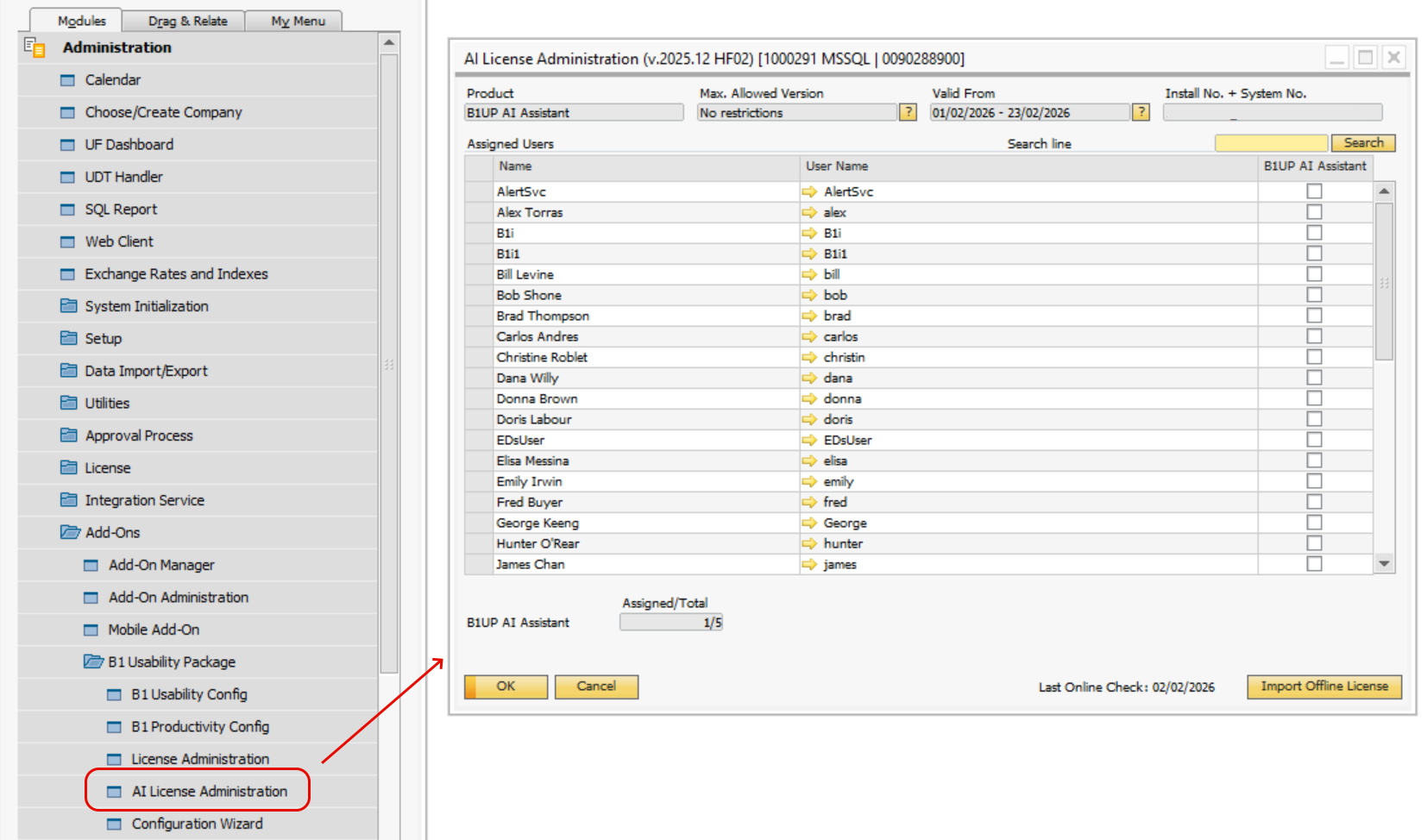
Assigning Licenses to Users
The AI License Administration form displays all SAP Business One users in a grid. To assign access to the AI Assistant:
1. Check the box next to each user who should have access to the AI Assistant. 2. The form shows how many licenses are assigned out of the total available (for example "3/10"). 3. Click Update to save your changes. |
|---|
Users must restart SAP Business One after being assigned a license for the change to take effect.
License Status Messages
Users may see different messages on the AI Widget depending on their license status:
No License Exists
"This feature requires a B1 AI Assistant license"
License Exists But User Not Assigned
"Your organization has a B1 AI Assistant license, but you have not been assigned access yet"
License Expired
"Your B1 AI Assistant license has expired"